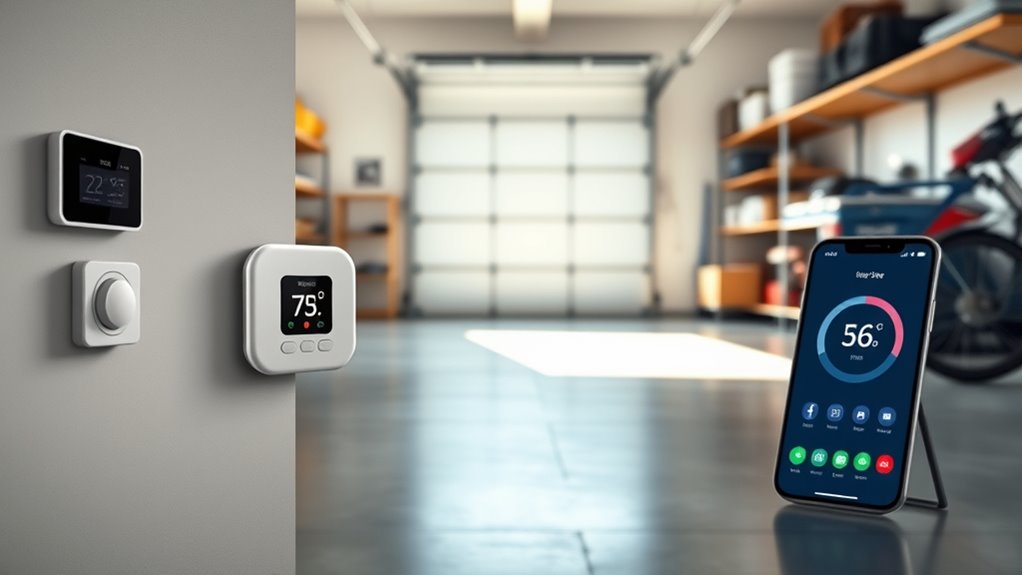

A WiFi garage temperature sensor can alert you to heat, cold, or humidity changes, but the right choice depends on how many areas you need to monitor and whether you want a local display. My best overall pick is the Govee H5179, a straightforward single-sensor option with app alerts. For broader coverage, the GoveeLife 2.0 six-mini-sensor kit monitors multiple locations, while the Govee H5103 adds an E-Ink display for at-a-glance readings. The main tradeoffs are sensor coverage, gateway and WiFi requirements, and how much you value a screen versus remote alerts. Read on for the full breakdown and help matching a sensor setup to your garage.

Get garden gear delivered free with Prime
- Fast, free delivery on millions of items
- Prime Video, Amazon Music and more included
- Member-only deals all year
Complete the kit


Key Takeaways
- Govee H5179 is the simplest all-around fit for a single garage zone when app alerts matter more than a built-in display.
- The six-sensor GoveeLife 2.0 kit is the broad-coverage choice; multiple sensors help reveal temperature differences across a large garage or nearby spaces.
- The H5103 stands apart for local readability with its E-Ink display, making it a better match for checking conditions without opening an app.
- Gateway bundles suit multi-sensor setups, but buyers should account for gateway placement and the need for a reliable connection where it is installed.
- Two- and three-sensor kits offer a middle ground between one-point monitoring and a larger distributed setup; choose based on actual zones, not sensor count alone.
| Govee H5179 WiFi Thermometer and Hygrometer with App Alerts |  | Best for Fast Remote Checks | Model: H5179 | Connectivity: Wi-Fi and Bluetooth | Wi-Fi compatibility: Does not support 5 GHz Wi-Fi | VIEW ON AMAZON | See Our Full Breakdown |
| Govee H5103 Wi-Fi Thermometer and Hygrometer with E-Ink Display |  | Best for Readable Local Monitoring | Model: H5103 | Connectivity: 2.4 GHz Wi-Fi and Bluetooth; no 5 GHz Wi-Fi | Temperature range: 32°F to 122°F | VIEW ON AMAZON | See Our Full Breakdown |
| GoveeLife WiFi Refrigerator Thermometer Sensor with Alarm, 2-Pack & Gateway | 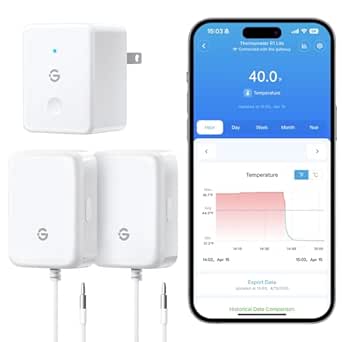 | Best for Garage Freezers | Included items: Two sensors and one gateway | Temperature range: -40°F to 158°F | Sensor accuracy: ±0.9°F | VIEW ON AMAZON | See Our Full Breakdown |
| SENCKIT Smart WiFi Hygrometer Thermometer with LCD Display |  | Best for Smart-Home Integration | Model: TH03Pro | Connectivity: 2.4 GHz Wi-Fi (IEEE 802.11b/g/n); no 5 GHz support | Temperature unit: Switchable between °C and °F | VIEW ON AMAZON | See Our Full Breakdown |
| GoveeLife WiFi Thermometer and Hygrometer, 3-Pack with Gateway | 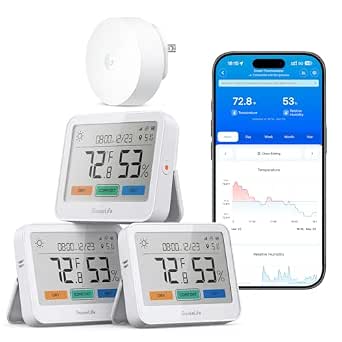 | Best for Multi-Zone Garage Monitoring | Included items: Three monitors and one gateway | Model: H5220 | Connectivity: Wi-Fi and Bluetooth | VIEW ON AMAZON | See Our Full Breakdown |
| GoveeLife 2.0 WiFi Hygrometer Thermometer with Gateway, 3 Mini Sensors | 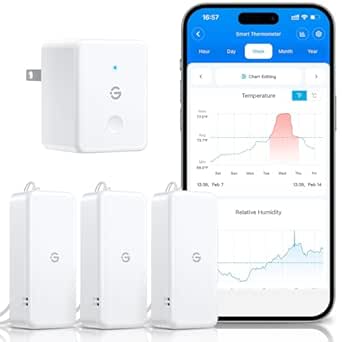 | Best for Detailed Garage Tracking | Sensors included: 3 thermo-hygrometers | Gateway: Included; compatible with H5151 and H5042 | Temperature accuracy: ±0.54°F / ±0.3°C | VIEW ON AMAZON | See Our Full Breakdown |
| Govee WiFi Thermometer Hygrometer H5179 (2 Pack) |  | Best for Simple Two-Zone Monitoring | Sensors included: 2 | Connectivity: Wi-Fi and Bluetooth | Sensor: Swiss made | VIEW ON AMAZON | See Our Full Breakdown |
| GoveeLife 2.0 Wi-Fi Hygrometer Thermometer with Gateway, 6 Mini Sensors |  | Best for Large or Multi-Zone Garages | Sensors included: 6 thermo-hygrometers | Gateway: Included; compatible with H5151 and H5042 | Gateway capacity: Supports up to 10 sensors | VIEW ON AMAZON | See Our Full Breakdown |
| wifi garage temperature sensor | Connectivity | Temperature accuracy | Model | Humidity accuracy |
|---|---|---|---|---|
| Govee H5179 WiFi Thermometer a | Wi-Fi and Bluetooth | ±0.54°F / ±0.3°C | H5179 | ±3% RH |
| Govee H5103 Wi-Fi Thermometer | 2.4 GHz Wi-Fi and Bluetooth; no 5 GHz Wi-Fi | ±0.3°C / ±0.54°F | H5103 | — |
| GoveeLife WiFi Refrigerator Th | Wi-Fi and Bluetooth | — | — | — |
| SENCKIT Smart WiFi Hygrometer | 2.4 GHz Wi-Fi (IEEE 802.11b/g/n); no 5 GHz support | ±1°C | TH03Pro | — |
| GoveeLife WiFi Thermometer and | Wi-Fi and Bluetooth | — | H5220 | — |
| GoveeLife 2.0 WiFi Hygrometer | — | ±0.54°F / ±0.3°C | — | ±3% RH |
| Govee WiFi Thermometer Hygrome | Wi-Fi and Bluetooth | ±0.54°F / ±0.3°C | — | ±3% RH |
| GoveeLife 2.0 Wi-Fi Hygrometer | — | ±0.54°F / ±0.3°C | — | ±3% RH |
More Details on Our Top Picks
Govee H5179 WiFi Thermometer and Hygrometer with App Alerts
The Govee H5179 is a straightforward fit for a garage where I mainly need quick temperature and humidity readings plus phone alerts. Its two-second refresh makes changing conditions easier to track than a monitor focused on occasional local checks, and it keeps 20 days of online history with export options for longer-term records. Compared with the H5103, it lacks a built-in display, so I have to open the app to see current readings. Setup also has a notable catch: alerts can only be configured over Bluetooth, even though remote monitoring works over Wi-Fi. It uses 2.4 GHz Wi-Fi rather than 5 GHz, so I would skip it if the garage network only offers 5 GHz.
Pros:- Wi-Fi and Bluetooth support remote app monitoring
- Readings refresh every two seconds
- App alerts can flag readings outside preset ranges
- Stores 20 days of online data and supports exports for up to two years
Cons:- Does not support 5 GHz Wi-Fi
- Alerts can only be configured over Bluetooth
- No built-in display for checking readings at the sensor
Best for: Garage owners who want frequent app-based temperature and humidity readings, remote monitoring, and exportable history without needing a local screen
Not ideal for: Buyers who want to configure alerts remotely or need a sensor compatible with a 5 GHz-only Wi-Fi network
- Model:H5179
- Connectivity:Wi-Fi and Bluetooth
- Wi-Fi compatibility:Does not support 5 GHz Wi-Fi
- Temperature accuracy:±0.54°F / ±0.3°C
- Humidity accuracy:±3% RH
- Refresh interval:2 seconds
- Online data storage:20 days
- Data export:Up to 2 years
Our verdict“Choose the H5179 if quick remote readings and data history matter more than a built-in display or remote alert setup.”
Govee H5103 Wi-Fi Thermometer and Hygrometer with E-Ink Display
The Govee H5103 suits a garage where I want to glance at the sensor itself, not rely on opening an app for every check. Its e-ink display shows temperature and humidity locally, while Wi-Fi and Bluetooth add remote monitoring and alerts. Like the H5179, readings refresh every two seconds and long-term data can be exported; the H5179 keeps 20 days of online data, while this model provides 13-day graphs. Its tabletop design works best on a shelf or workbench, rather than mounted out of the way. The roughly six-month battery life and AA battery requirement also mean more upkeep than the GoveeLife H5220, which lists up to a year with gateway use.
Pros:- E-ink screen provides local temperature and humidity readings
- Wi-Fi and Bluetooth support app monitoring and alerts
- Two-second reading refresh
- Data exports are available for up to two years
Cons:- Does not support 5 GHz Wi-Fi
- About six months of battery life with AA alkaline batteries
- Tabletop mounting may limit placement options in a garage
Best for: Garage owners who want a clear on-device reading alongside app access and can place a tabletop monitor on a shelf or bench
Not ideal for: Buyers who need wall mounting, longer listed battery life, or a 5 GHz Wi-Fi connection
- Model:H5103
- Connectivity:2.4 GHz Wi-Fi and Bluetooth; no 5 GHz Wi-Fi
- Temperature range:32°F to 122°F
- Temperature accuracy:±0.3°C / ±0.54°F
- Humidity range:Approximately 3% to 97% RH
- Display:Electronic ink
- Battery:1.5 V AA alkaline; about 6 months of battery life
- Data storage and export:13-day graphs; exports for up to 2 years
- Mounting and dimensions:Tabletop; 2.86 in W × 2.89 in H
Our verdict“Pick the H5103 if a readable local display is more useful to you than the H5179’s longer online history.”
GoveeLife WiFi Refrigerator Thermometer Sensor with Alarm, 2-Pack & Gateway
This GoveeLife two-sensor kit is the specialist pick for a garage with a freezer, refrigerator, or other temperature-sensitive storage. The included gateway and two sensors support remote monitoring, while app, email, and buzzer alerts offer more ways to catch a temperature excursion than the single H5179. Its stated -40°F to 158°F range also covers conditions outside the H5103’s listed range. The tradeoff is focus: this set tracks temperature, not humidity, and its product data describes refrigerator use rather than a general-purpose garage display. The 80 dB buzzer must be reset manually, and full functionality depends on Wi-Fi, so I would choose the H5220 instead for broad temperature-and-humidity monitoring around the garage.
Pros:- Two sensors and a gateway allow monitoring at separate locations
- Temperature range spans -40°F to 158°F
- Alerts are available through the app, email, and an 80 dB buzzer
- Magnetic and hanging installation options support flexible placement
Cons:- Monitors temperature rather than humidity
- The buzzer requires manual reset
- Full functionality depends on a Wi-Fi connection
Best for: Homeowners who keep a refrigerator or freezer in the garage and want remote temperature alerts from two monitored points
Not ideal for: Buyers seeking humidity readings, a local display, or a general-purpose garage climate monitor
- Included items:Two sensors and one gateway
- Temperature range:-40°F to 158°F
- Sensor accuracy:±0.9°F
- Response time:2 seconds
- Connectivity:Wi-Fi and Bluetooth
- Alarm volume:80 dB
- Power source:4 AAA batteries included
- Range:230 ft / 70 m
- Installation:Magnetic and hanging options
Our verdict“Choose this kit for monitoring a garage fridge or freezer, but choose the H5220 if you also need humidity readings and local displays.”
SENCKIT Smart WiFi Hygrometer Thermometer with LCD Display
The SENCKIT TH03Pro stands apart from the Govee H5103 by pairing a local LCD display with Alexa and Google Assistant support. That makes it a better match for a garage already tied into voice-controlled routines, while its app adds customizable alerts, calibration, trend graphs, and data export. The product data lists an upper temperature range of 60°C but does not specify a lower limit, so I would check suitability if the garage can get especially cold. Its ±1°C temperature accuracy is also less precise on paper than the H5179 and H5103, both listed at ±0.3°C. This model uses two AAA batteries and 2.4 GHz Wi-Fi, so it is not a fit for a 5 GHz-only network.
Pros:- LCD shows local readings without opening the app
- Supports Amazon Alexa and Google Assistant
- Manual temperature and humidity calibration is available
- Offers daily, weekly, and monthly trends with data export
Cons:- Temperature accuracy is listed as ±1°C, less precise than the Govee H5179 and H5103
- Only 2.4 GHz Wi-Fi is supported
- Product data specifies an upper temperature limit but no lower limit
Best for: Smart-home owners who want local LCD readings, voice-assistant compatibility, adjustable calibration, and app-based trends in a garage
Not ideal for: Buyers who prioritize tighter stated temperature accuracy, need a specified cold-temperature limit, or use only 5 GHz Wi-Fi
- Model:TH03Pro
- Connectivity:2.4 GHz Wi-Fi (IEEE 802.11b/g/n); no 5 GHz support
- Temperature unit:Switchable between °C and °F
- Upper temperature range:60°C
- Temperature accuracy:±1°C
- Display:LCD
- Power:2 AAA alkaline batteries
- Compatibility:Amazon Alexa and Google Assistant
- Data features:Daily, weekly, and monthly trends; data export
Our verdict“Choose the TH03Pro if voice-assistant support and calibration matter more than tighter stated accuracy or a clearly specified cold-weather range.”
GoveeLife WiFi Thermometer and Hygrometer, 3-Pack with Gateway
For a garage split between a work area, storage shelves, and a greenhouse or hobby zone, the GoveeLife H5220 three-pack offers broader coverage than the single H5179 or tabletop H5103. Each monitor has a 3.7-inch LCD, and the gateway supports remote alerts by push notification, app, email, and buzzer. Its stated accuracy—±0.36°F for temperature and ±2% RH for humidity—is tighter than the H5179’s listed figures, while the gateway’s open-air range reaches up to 1,640 feet. That range is not a promise through garage walls or obstructions. Battery life is listed at up to one year with gateway use, versus two years on Bluetooth, so the more connected setup brings more frequent battery changes. The local weather forecast also requires the H5044 gateway.
Pros:- Three monitors and a gateway cover multiple locations
- Large 3.7-inch LCD provides local readings at each monitor
- Temperature and humidity accuracy are listed as ±0.36°F and ±2% RH
- Supports push, app, email, and gateway buzzer alerts
Cons:- Gateway use reduces listed battery life to up to one year, compared with up to two years on Bluetooth
- Weather forecast feature requires the H5044 gateway
- The 1,640-foot range is specified for open air and may be reduced by walls or obstructions
Best for: Owners who want to monitor several garage zones, such as a workshop, storage area, and greenhouse, with local screens and remote alerts
Not ideal for: Buyers who need a single compact sensor, want the longest stated battery life while using a gateway, or expect the weather forecast feature without the H5044 gateway
- Included items:Three monitors and one gateway
- Model:H5220
- Connectivity:Wi-Fi and Bluetooth
- Display:3.7-inch LCD
- Temperature range:-4°F to 140°F
- Humidity range:0% to 99% RH
- Accuracy:Temperature ±0.36°F; humidity ±2% RH
- Refresh rate:2 seconds
- Power and battery life:2 AA batteries per monitor; up to 2 years on Bluetooth or 1 year with gateway
Our verdict“Pick the H5220 if you need several readable monitoring points and varied remote alerts, rather than one simple garage sensor.”
GoveeLife 2.0 WiFi Hygrometer Thermometer with Gateway, 3 Mini Sensors
For a garage with several zones to watch, this kit pairs three sensors with a Wi-Fi gateway so I can monitor temperature and humidity remotely through the app. Readings refresh every two seconds, while 20 days of trend charts and exports covering up to two years help reveal recurring swings rather than just current conditions. Compared with the Govee WiFi Thermometer Hygrometer H5179 2 Pack, this set includes a gateway and a third sensor, making it a better fit for monitoring separate areas without buying another sensor set. Its tradeoff is network flexibility: it supports 2.4 GHz Wi-Fi only and depends on a compatible gateway. I’d skip it if I need 5 GHz support or a standalone Wi-Fi sensor.
Pros:- Three sensors make it practical to compare conditions across garage zones.
- App and email alerts support remote monitoring when readings cross set limits.
- Two-second refreshes and up to two years of data exports help track changing conditions.
- Compact sensors include lanyards for flexible placement.
Cons:- Works with 2.4 GHz Wi-Fi only.
- Requires the included gateway or a compatible H5151 or H5042 gateway.
Best for: Garage owners who want to monitor three locations, such as near a door, in a storage area, and beside temperature-sensitive belongings, with long-term data exports.
Not ideal for: Buyers who need 5 GHz Wi-Fi or already want a standalone sensor without a compatible gateway.
- Sensors included:3 thermo-hygrometers
- Gateway:Included; compatible with H5151 and H5042
- Temperature accuracy:±0.54°F / ±0.3°C
- Humidity accuracy:±3% RH
- Data refresh rate:Every 2 seconds
- Data history:20 days of trend charts; export up to 2 years
- Battery life:Stated 2 years
- Wi-Fi:2.4 GHz only
Our verdict“Choose this kit if you want gateway-based monitoring across three garage locations and value long-term data exports.”
Govee WiFi Thermometer Hygrometer H5179 (2 Pack)
This two-pack suits a garage where I only need to compare a couple of spots, such as the main bay and a cabinet, without committing to a gateway kit. The Govee Home app provides temperature and humidity readings, preset-range alerts, and historical data; the Swiss-made sensors are specified at ±0.54°F and ±3% RH. Compared with the GoveeLife 2.0 kit with three mini sensors, the H5179 set has one fewer sensor and its listed connectivity includes Wi-Fi and Bluetooth, rather than a separate gateway in the box. That simpler sensor count can be easier to place, but setup and remote alerts may depend on Bluetooth configuration, and it still does not support 5 GHz networks. I’d choose it for basic two-point coverage, not a larger garage monitoring plan.
Pros:- Two sensors allow a direct comparison between separate garage areas.
- Preset-range alerts provide notice when readings move outside chosen limits.
- Stores 20 days online and supports exporting up to two years of data.
- Compact bodies with lanyard loops offer flexible placement.
Cons:- Does not support 5 GHz Wi-Fi networks.
- Bluetooth-only alert setup may limit remote notifications.
- Runs on three AA batteries.
Best for: Garage owners who need app-based temperature and humidity checks at two locations and want to avoid managing three or more sensors.
Not ideal for: Buyers monitoring several garage zones or those whose Wi-Fi network is 5 GHz-only.
- Sensors included:2
- Connectivity:Wi-Fi and Bluetooth
- Sensor:Swiss made
- Temperature accuracy:±0.54°F / ±0.3°C
- Humidity accuracy:±3% RH
- Data storage:20 days online; export up to 2 years
- Power:3 AA batteries
Our verdict“Pick the H5179 two-pack for straightforward app monitoring in two garage spots, but choose a multi-sensor gateway kit for broader coverage.”
GoveeLife 2.0 Wi-Fi Hygrometer Thermometer with Gateway, 6 Mini Sensors
When one garage sensor cannot cover the whole space, this six-sensor bundle offers the broadest included coverage in this group. The gateway connects the mini sensors to the app, where I can set temperature and humidity alerts, check readings that refresh every two seconds, and review 20 days of trends or export up to two years of data. Compared with the three-sensor GoveeLife 2.0 kit, this version is better suited to a large garage or several storage zones, and its gateway can support up to 10 sensors. The added coverage comes with the same constraints: 2.4 GHz Wi-Fi only and a gateway requirement. For a typical single-bay garage, the Govee WiFi H5179 two-pack may be simpler; this bundle makes sense when six monitoring points will actually be used.
Pros:- Six included sensors provide broad coverage across garage zones.
- Gateway supports up to 10 sensors for potential expansion.
- App alerts can flag preset temperature and humidity limits.
- Two-second refreshes, 20-day trends, and up to two years of exports support ongoing tracking.
Cons:- Supports 2.4 GHz Wi-Fi only.
- Requires the included gateway or a compatible H5151 or H5042 gateway.
Best for: Owners of large garages, workshops, or multi-zone storage spaces who want readings and alerts from several locations through one gateway.
Not ideal for: People monitoring only one or two spots, or buyers who need 5 GHz Wi-Fi or a gateway-free setup.
- Sensors included:6 thermo-hygrometers
- Gateway:Included; compatible with H5151 and H5042
- Gateway capacity:Supports up to 10 sensors
- Temperature accuracy:±0.54°F / ±0.3°C
- Humidity accuracy:±3% RH
- Data refresh rate:Every 2 seconds
- Data history:20 days of trends; export up to 2 years
- Battery life:Stated 2 years
- Wi-Fi:2.4 GHz only
Our verdict“Choose this bundle when you need six monitoring points across a large garage; for a smaller space, a two- or three-sensor set is more proportionate.”
How We Picked
I ranked these options around how well they serve the specific job of monitoring a garage: useful temperature and humidity readings, remote access or alerts, sensible coverage, and a setup that fits the space. I also weighed practical differences that change the buying decision, including a built-in display, whether a gateway is part of the package, and how many sensors come with it.
The H5179 leads for straightforward single-zone monitoring; the H5103 earns a distinct place for its screen, while the multi-sensor GoveeLife bundles rank higher for buyers who need readings from several areas. Two-pack and three-pack choices sit between those approaches. The refrigerator-focused kit is included as a specialized option, but its use case is narrower for a typical garage. Product names and bundled hardware can differ, so I recommend checking current connectivity and placement requirements before choosing.
| wifi garage temperature sensor | Model | Temperature accuracy |
|---|---|---|
| Govee H5179 WiFi Thermometer a | H5179 | ±0.54°F / ±0.3°C |
| Govee H5103 Wi-Fi Thermometer | H5103 | ±0.3°C / ±0.54°F |
| GoveeLife WiFi Refrigerator Th | — | — |
| SENCKIT Smart WiFi Hygrometer | TH03Pro | ±1°C |
| GoveeLife WiFi Thermometer and | H5220 | — |
| GoveeLife 2.0 WiFi Hygrometer | — | ±0.54°F / ±0.3°C |
| Govee WiFi Thermometer Hygrome | — | ±0.54°F / ±0.3°C |
| GoveeLife 2.0 Wi-Fi Hygrometer | — | ±0.54°F / ±0.3°C |
Factors to Consider When Choosing Wifi Garage Temperature Sensor
Choosing a garage sensor is less about collecting the most features and more about getting dependable readings from the places that matter. I would start with the layout, the kind of alerts you need, and the connection path from the garage to your home network.
Decide How Many Garage Zones Need Monitoring
One sensor can be enough for a small, open garage where conditions are fairly uniform. A long garage, attached workshop, storage loft, or detached outbuilding may have meaningful temperature differences between areas. Multiple sensors can show whether a cold corner, sun-exposed wall, or enclosed cabinet is driving the reading. Avoid buying a larger bundle just because more sensors sound safer; first identify where separate measurements would change a decision. If you need only one representative reading, a single-sensor model keeps setup and battery upkeep simpler. For several distinct zones, compare the total sensor count and how each kit handles pairing and naming sensors.
Check the WiFi Path Before You Buy
A sensor marketed as WiFi-connected may rely on a gateway to relay data, so check what connects directly to your router and what communicates through a hub. Garage walls, metal doors, and distance can weaken signals even when WiFi works well indoors. Place the gateway where it can reach both the router and the sensors rather than assuming it belongs beside the garage device. A detached garage may need a stronger network link before any sensor can report reliably. If you cannot get a stable connection to the location, app features will not compensate for it. Confirm the product’s network requirements and test coverage at the intended mounting point if possible.
Choose Alerts That Match What You Need to Protect
Temperature alerts are useful when a change could affect stored supplies, equipment, or a workspace, but alert settings should reflect the real risk. A narrow threshold can create repeated notifications as readings fluctuate, while a broad one may report a problem too late. Humidity readings can also help flag damp conditions, though a sensor cannot prevent condensation or water intrusion by itself. Before choosing, check whether alerts arrive through the app and whether you can set separate limits for different sensors. Think about who will receive notifications and whether they can respond when away. For routine monitoring, a visible reading may matter more than frequent alerts; for vulnerable items, remote warnings may carry more weight.
Decide Whether a Display Is Worth Prioritizing
A screen lets anyone nearby check conditions without a phone, which is handy in a workshop or shared garage. An app-first sensor is less cluttered and can be easier to place out of the way, but checking a reading takes an extra step. E-Ink is suited to a glanceable display, while a basic LCD offers a different visual experience; the specific device and placement matter more than display type alone. A screen also does not replace remote monitoring when you are away from home. Consider who will use the reading: a homeowner checking remotely may favor alerts, while someone working in the garage may prefer local visibility. Do not pay extra for a display if nobody will look at it.
Plan for Sensor Placement and Garage Conditions
Mounting location affects what a sensor tells you: a device near a sunny window, heater, exterior door, or ceiling may report a local extreme rather than the conditions where stored items sit. Place it away from direct heat and airflow, and follow the maker’s guidance for indoor use and exposure limits. A garage can be dusty, damp, or subject to large swings, so check the device’s stated operating conditions rather than assuming every home sensor is suited to every spot. For a specific concern, such as a freezer or a damp storage corner, position a sensor near that area without putting it where it could be damaged. If you monitor multiple zones, keep placement consistent enough to make readings useful to compare. The best bundle cannot correct for poor placement.
Compare Ongoing Upkeep, Not Just the Kit Contents
Every additional sensor creates another device to name, place, and maintain. Before choosing a multi-pack, check how the product is powered and what battery replacement involves. A gateway adds another piece of equipment and a location that needs a stable connection, even when it makes multi-sensor monitoring practical. Also consider whether you want readings in one app and how easy it is for other household members to access them. A simpler single-sensor setup may be the better long-term fit if you only need one alert point. Larger bundles make sense when each sensor has a clear job, not merely because they offer more coverage on paper.
Frequently Asked Questions
Will a WiFi temperature sensor work in a detached garage?
It can, but the deciding factor is whether the sensor or its gateway can communicate reliably with your home network from the garage. Distance, exterior walls, and metal construction can all weaken a signal. Check whether the model connects directly to WiFi or uses a gateway, then assess the connection at the intended device locations. A weak link can cause gaps in remote readings or alerts even if the sensor itself is working. If the network does not reach the garage, improving coverage may matter more than choosing a different sensor.
Should I choose one sensor or a multi-sensor kit for my garage?
Choose one sensor when the garage is small and you only need a general reading from one representative area. A multi-sensor kit is more useful when you want to compare a workshop, storage corner, and area near an exterior wall, or when one gateway serves several locations. More sensors do not automatically make monitoring better; they add setup and upkeep. Decide which separate readings would lead you to take a different action. If you cannot name a purpose for each sensor, a single unit or smaller bundle is likely enough.
Do I need a display if the sensor sends readings to an app?
No, not if you mainly want to check conditions remotely or receive alerts on your phone. A built-in display helps when you or another person regularly works in the garage and wants an immediate reading without opening an app. It can also make the device more useful to household members who do not manage the sensor account. The tradeoff is that a display may be less valuable if the sensor is mounted out of sight. Choose based on how you will actually check readings, not on the screen alone.
Can a garage temperature sensor warn me about freezing conditions?
A sensor with app alerts can notify you when a reading crosses a threshold you set, which may give you time to respond to cold conditions. Check that the alert feature supports your preferred limits and that the phone, sensor, and any gateway remain connected. Set the threshold around the needs of the items or systems you want to protect rather than relying on a generic setting. A notification is not the same as active temperature control, and it cannot prevent damage if no one can act on it. For a high-risk situation, plan a backup response as well.
Is a refrigerator-focused sensor a sensible choice for a garage?
It may suit a garage that also contains a refrigerator or freezer, particularly if you want to monitor that appliance rather than the room alone. Its alarm-oriented design addresses a narrower job than a general-purpose sensor used to track workshop or storage conditions. Check the product’s stated temperature range and placement guidance before using it outside an appliance. If your main goal is monitoring the overall garage, a general WiFi thermometer and hygrometer is usually a more natural fit. Choose the specialized option when its appliance-monitoring purpose matches your actual concern.
Conclusion
For most buyers who need one dependable app-connected reading, I would start with the Govee H5179 as best overall. The H5179 two-pack is my best value direction when you already know you need two measurement points, while the GoveeLife 2.0 six-mini-sensor kit is the premium pick for broad coverage across several zones. Beginners who want a straightforward single-sensor setup should favor the H5179; those who want a visible reading should choose the H5103 with its E-Ink display. For appliance-focused monitoring in a garage, the GoveeLife refrigerator sensor kit is the more specialized choice. Match the sensor count to your layout, then confirm the network path before deciding.
Halloween Picks
halloween
As an affiliate, we earn on qualifying purchases.