
The best home automation hubs bring devices from different brands together, but the right choice depends on what you want to connect and how much setup you will take on. I rank Home Assistant Green as the best overall for broad, customizable control, while Hubitat Elevation C-8 Pro is a strong pick for local-first automation and Lutron Caseta stands out for dependable lighting control. The main tradeoff is between flexibility and simplicity: a powerful hub can demand more configuration, while an easier system may support fewer devices or automation styles. Radio support, internet dependence, and the need for a particular brand ecosystem also shape the decision. Read on for the full breakdown and a guide to matching a hub to your home.

Get garden gear delivered free — and shop member deals
- Fast, free delivery on millions of items
- Access to Prime Big Deal Days deals on October 6–7
- Prime Video, Amazon Music and more included
Complete the kit


Key Takeaways
- Home Assistant Green leads for buyers who want broad integrations and room to customize, but it asks for more hands-on setup than a focused hub.
- Hubitat Elevation C-8 Pro prioritizes local automation, making it a better fit for shoppers who value routines that can keep working without cloud services.
- Lutron Caseta is the clearest specialist choice: its hub is most compelling when reliable lighting control matters more than serving as a universal device hub.
- Aeotec Smart Home Hub and Samsung SmartThings Hub 3rd Generation suit shoppers seeking a familiar SmartThings-centered setup, but buyers should check generation-specific support before committing.
- YoLink, Tapo H100, and the two Aqara hubs show that a hub built around a device family or feature set can be a better fit than chasing maximum compatibility.
| Home Assistant Green Smart Home Hub |  | Best for Local Control | Processor: Quad-core | Storage: 32GB | RAM: 4GB | VIEW LATEST PRICE | See Our Full Breakdown |
| Lutron Caseta Deluxe Smart Dimmer Starter Kit with Hub and Pico Remotes |  | Best for Smart Lighting | Included components: 1 Smart Hub, 2 dimmer switches, 2 Pico 3-button remotes, 2 wall plates | Maximum LED load: 150W dimmable LEDs | Neutral wire required: No | VIEW LATEST PRICE | See Our Full Breakdown |
| Aqara Smart Hub M100 Matter Controller |  | Best Compact Matter Bridge | Protocols: Matter, Thread, Aqara Zigbee | Device capacity: 20 Aqara Zigbee devices and 20 Thread devices | Connectivity: 2.4GHz Wi-Fi 6 | VIEW LATEST PRICE | See Our Full Breakdown |
| Hubitat Elevation C-8 Pro Smart Home Hub |  | Best for Advanced Multi-Protocol Automation | Protocols: Matter 1.5, Z-Wave 800 Series with Long Range, Zigbee 3.0, Bluetooth | Voice assistants: Amazon Alexa, Google Home, Apple HomeKit | Device compatibility: 1,000+ devices across 100+ brands | VIEW LATEST PRICE | See Our Full Breakdown |
| YoLink Smart Home Hub (YS1603) |  | Best for YoLink Devices | Model: YS1603 | Brand: YoLink | Type: Smart home hub | VIEW LATEST PRICE | See Our Full Breakdown |
| Tapo Smart Hub H100 with Built-in Chime | 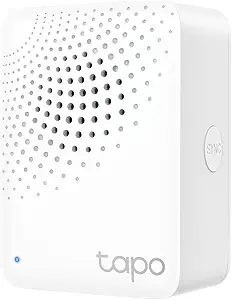 | Best for Tapo Sensors and Alerts | Maximum connection distance: 30 m | Supported Wi-Fi frequency: 2.4 GHz | Device capacity: Up to 64 Tapo devices | VIEW LATEST PRICE | See Our Full Breakdown |
| Aeotec Smart Home Hub with SmartThings, Z-Wave, Zigbee, and Matter |  | Best for Mixed-Protocol Homes | Model: V3 Smart Home Hub (2020) | Model number: GP-AEOHUBV3US | Connectivity: Ethernet, Wi-Fi, Z-Wave, Zigbee, Matter | VIEW LATEST PRICE | See Our Full Breakdown |
| Aqara Smart Home Hub M3 – Advanced Automation, Matter Controller & IR Blaster |  | Best for Local Automation and IR Control | Model: HM-G01E | Supported protocols: Zigbee, Thread, Bluetooth, Matter | Connectivity: Dual-band Wi-Fi (2.4/5 GHz), PoE, USB-C | VIEW LATEST PRICE | See Our Full Breakdown |
| Samsung SmartThings Hub 3rd Generation, White |  | Best for Existing SmartThings Setups | Model: GP-U999SJVLGDA | Connectivity: Zigbee, Z-Wave, cloud-to-cloud protocols | Dimensions: 5 x 5 x 1.2 inches | VIEW LATEST PRICE | See Our Full Breakdown |
| home automation hub | Connectivity |
|---|---|
| Home Assistant Green Smart Hom | Ethernet; USB expansion for Z-Wave, Zigbee, and Thread devices |
| Lutron Caseta Deluxe Smart Dim | — |
| Aqara Smart Hub M100 Matter Co | 2.4GHz Wi-Fi 6 |
| Hubitat Elevation C-8 Pro Smar | — |
| YoLink Smart Home Hub | — |
| Tapo Smart Hub H100 with Built | — |
| Aeotec Smart Home Hub with Sma | Ethernet, Wi-Fi, Z-Wave, Zigbee, Matter |
| Aqara Smart Home Hub M3 | Dual-band Wi-Fi (2.4/5 GHz), PoE, USB-C |
| Samsung SmartThings Hub 3rd Ge | Zigbee, Z-Wave, cloud-to-cloud protocols |
More Details on Our Top Picks
Home Assistant Green Smart Home Hub
Home Assistant Green is my pick for people who want a flexible hub with their home data kept locally. Home Assistant comes preinstalled, so setup starts with the software in place rather than a separate installation. Its fanless, low-power design can run quietly around the clock, while USB expansion lets you add connectivity for Z-Wave, Zigbee, or Thread devices as your setup grows. Unlike the Hubitat Elevation C-8 Pro, Green needs additional USB devices for those radio protocols, so its base setup is less all-in-one. It also requires Ethernet to get started, which rules out a purely wireless placement. I’d choose Green for a customizable Home Assistant system; buyers seeking a guided lighting kit may find the Lutron Caseta option simpler.
Pros:- Home Assistant is preinstalled, reducing the work required to get the platform running.
- Keeps home data stored locally.
- Fanless, silent design uses only a couple of watts.
- USB expansion allows additional Z-Wave, Zigbee, or Thread connectivity.
Cons:- Requires Ethernet for initial setup and connection.
- Z-Wave, Zigbee, and Thread support requires separate USB devices.
Best for: Home Assistant users who want a compact, quiet hub, local data storage, and the option to add device protocols through USB.
Not ideal for: Buyers who need built-in Zigbee, Z-Wave, or Thread connectivity, or who cannot connect the hub to Ethernet during setup.
- Processor:Quad-core
- Storage:32GB
- RAM:4GB
- Design:Compact, fanless, and silent
- Power consumption:A couple of watts
- Connectivity:Ethernet; USB expansion for Z-Wave, Zigbee, and Thread devices
- Software:Home Assistant preinstalled
- Manufacturer/support:Nabu Casa
Our verdict“Choose Home Assistant Green if you value local control and customization and are comfortable adding radios as needed.”
Lutron Caseta Deluxe Smart Dimmer Starter Kit with Hub and Pico Remotes
The Lutron Caseta Deluxe kit makes the most sense when lighting control—not broad device automation—is the main goal. Two dimmers, Pico remotes, and wall plates give households several ways to control lights, including at the wall when a phone or voice assistant is inconvenient. The dimmers do not require a neutral wire, which can make them a fit for homes where some other smart switches are harder to install. The hub also works without Wi-Fi and connects with Alexa, Apple HomeKit, Google Home, and Ring. Compared with the more protocol-focused Hubitat Elevation C-8 Pro, Caseta is a narrower lighting system rather than a hub for many device types. Its dimmers are limited to dimmable LEDs up to 150W, so I’d skip it for non-dimmable lighting or a whole-home automation platform.
Pros:- Hub operates without Wi-Fi for lighting control.
- Dimmers do not require a neutral wire.
- Includes two Pico remotes and wall plates for physical control.
- Supports app, voice, schedules, scenes, and geofencing.
Cons:- Dimmers support only dimmable LED bulbs, up to 150W.
- Pico remote batteries may eventually need replacement.
Best for: Homeowners who want dependable smart control of multiple dimmable LED circuits, with physical remotes and no-neutral-wire installation.
Not ideal for: Buyers seeking a general-purpose hub for sensors and mixed smart devices, or anyone using bulbs that are not dimmable LEDs.
- Included components:1 Smart Hub, 2 dimmer switches, 2 Pico 3-button remotes, 2 wall plates
- Maximum LED load:150W dimmable LEDs
- Neutral wire required:No
- Pico remote battery life:Up to 10 years
- Smart home compatibility:Alexa, Apple HomeKit, Google Home, Ring, and others
- Control options:Lutron app, Pico remotes, voice control, schedules, scenes, and geofencing
Our verdict“Pick this kit for a ready-to-use smart lighting setup with flexible physical controls, not as a hub for every smart device in the home.”
Aqara Smart Hub M100 Matter Controller
Aqara Smart Hub M100 is a compact bridge for buyers who want to bring Aqara Zigbee devices into Matter-friendly systems without choosing a large, general-purpose hub. It also supports Thread and can run local automations, so supported routines can respond even when internet access is unavailable. Its adjustable shaft and USB-A power make placement more flexible than the Ethernet-dependent Home Assistant Green, though a suitable power adapter is not included. M100’s key limitation is its ecosystem boundary: it supports Aqara Zigbee devices, not third-party Zigbee devices. That makes it a focused fit for an Aqara setup, while the multi-protocol Hubitat Elevation C-8 Pro is a stronger match for mixed brands and device types. Some cloud-dependent features still need internet access.
Pros:- Local automation can run without internet access.
- Bridges Aqara Zigbee devices to Matter ecosystems such as Apple Home and Alexa.
- Adjustable shaft supports flexible placement.
- Supports Matter, Thread, and Aqara Zigbee.
Cons:- Does not support third-party Zigbee devices.
- USB-A power adapter is not included.
- Some cloud-dependent features require internet access.
Best for: Aqara device owners who want a small Matter bridge, local automation, and compatibility with ecosystems such as Apple Home or Alexa.
Not ideal for: Shoppers building a mixed-brand Zigbee network or those who want a hub with an included power adapter and fewer ecosystem limits.
- Protocols:Matter, Thread, Aqara Zigbee
- Device capacity:20 Aqara Zigbee devices and 20 Thread devices
- Connectivity:2.4GHz Wi-Fi 6
- Power input:USB-A, 5V 0.5A adapter not included
- Adjustability:210-degree adjustable shaft
- Security:WPA3
- Recommended distance:6–19 feet from router
Our verdict“Choose M100 for a compact Aqara-to-Matter bridge, but choose Hubitat if you need broader mixed-brand protocol support.”
Hubitat Elevation C-8 Pro Smart Home Hub
The Hubitat Elevation C-8 Pro earns its place for households combining devices across several protocols and wanting automations processed locally. Its support for Matter, Z-Wave, Zigbee, and Bluetooth makes it more ready for a mixed-device setup than the Aqara M100, whose Zigbee support is limited to Aqara devices. Hubitat also works with Alexa, Google Home, and Apple HomeKit, and its advanced rule engine offers room to build more specific routines. Local processing can keep automations running through internet outages, and the platform does not require a recurring subscription. The tradeoff is a steeper setup path: the documentation or user community may be needed, unlike the more focused Lutron Caseta lighting kit. I’d favor C-8 Pro for breadth and control, not for someone seeking the simplest plug-in setup.
Pros:- Local processing keeps automations running during internet outages.
- Supports Matter, Z-Wave, Zigbee, and Bluetooth.
- Works with Alexa, Google Home, and Apple HomeKit.
- Offers an advanced rule engine and AI-assisted routine building without a subscription.
Cons:- Setup may require step-by-step documentation or help from the user community.
- Its advanced automation options may be more involved than a focused hub such as Lutron Caseta.
Best for: Experienced smart-home owners building a mixed-brand system who want local routines, broad protocol support, and detailed automation rules.
Not ideal for: Beginners who want a guided, minimal-setup hub or buyers whose needs are limited to straightforward smart lighting.
- Protocols:Matter 1.5, Z-Wave 800 Series with Long Range, Zigbee 3.0, Bluetooth
- Voice assistants:Amazon Alexa, Google Home, Apple HomeKit
- Device compatibility:1,000+ devices across 100+ brands
- Antennas:2 dedicated external antennas
- Dimensions:3.23 x 2.95 x 0.67 in
- Weight:0.16 lb
- Processing:Local
Our verdict“Choose the C-8 Pro if you want broad protocol coverage and local, detailed automations and are willing to spend time on setup.”
YoLink Smart Home Hub (YS1603)
The YoLink Smart Home Hub YS1603 is a sensible central controller for people already choosing YoLink sensors and actuators. Its dedicated LoRa-based network is the main reason to pick it: it connects compatible devices through YoLink’s own ecosystem rather than acting as a general hub for every smart-home brand. Compared with the Hubitat Elevation C-8 Pro, which supports multiple protocols and voice assistant platforms, the YS1603 has a narrower role and the supplied data does not establish broad third-party compatibility. That focus can make setup straightforward for existing YoLink users, but new buyers need compatible devices separately and should be comfortable building around one brand. I’d choose it to manage a YoLink installation, not as the starting point for a mixed-protocol smart home.
Pros:- Centralizes control of compatible YoLink devices.
- Uses a dedicated LoRa-based network for device connectivity.
- Can be an easy fit for households already using YoLink devices.
Cons:- Compatibility is limited to the YoLink ecosystem.
- Compatible devices must be purchased separately.
Best for: Existing YoLink users who want a central controller for compatible sensors and actuators using the YoLink LoRa network.
Not ideal for: Buyers seeking a multi-brand, multi-protocol hub or anyone who expects compatible sensors and actuators to be included.
- Model:YS1603
- Brand:YoLink
- Type:Smart home hub
- Network:Dedicated LoRa-based network
- Device compatibility:Compatible YoLink sensors and actuators
Our verdict“Choose the YS1603 if you are building around YoLink devices; choose Hubitat instead for a broader mix of brands and protocols.”
Tapo Smart Hub H100 with Built-in Chime
I’d choose the Tapo H100 for a home built around Tapo sensors, buttons, and switches rather than as a universal hub for every smart device. Its advertised 30 m connection range and low-power wireless protocol are useful when sensors sit far from the hub or when fewer battery changes matter. The built-in 90 dB siren also gives sensor-based alerts a more direct security role than a basic connectivity bridge. Unlike the Aeotec Smart Home Hub, which supports several major ecosystems and protocols, the H100 is limited to Tapo devices and requires 2.4 GHz Wi-Fi. It also cannot directly connect Tapo smart plugs or lighting, so buyers seeking one hub for broad device control should look elsewhere.
Pros:- Supports up to 64 Tapo devices.
- Advertised connection distance reaches up to 30 m.
- Low-power wireless protocol is designed to extend connected device battery life.
- Built-in 90 dB siren can sound alerts from the hub.
Cons:- Does not directly connect to Tapo smart plugs or lighting.
- Requires 2.4 GHz Wi-Fi for hub operation.
- Its device support is narrower than the Aeotec hub’s multi-protocol approach.
Best for: Households building a Tapo sensor and button setup that want extended sensor battery life and an integrated audible alert.
Not ideal for: Buyers seeking one hub for mixed-brand devices, Tapo plugs, or Tapo lighting, or homes without 2.4 GHz Wi-Fi.
- Maximum connection distance:30 m
- Supported Wi-Fi frequency:2.4 GHz
- Device capacity:Up to 64 Tapo devices
- Siren sound level:90 dB
- Wireless power protocol:Ultra-low-power wireless; stated to extend battery life up to 10×
- Wi-Fi requirement:2.4 GHz Wi-Fi required for hub operation
Our verdict“Choose the H100 if your priority is a Tapo sensor network with long-range connectivity and a built-in siren, not broad smart-home compatibility.”
Aeotec Smart Home Hub with SmartThings, Z-Wave, Zigbee, and Matter
The Aeotec Smart Home Hub is my pick here for buyers who want one hub to bridge devices from different generations and ecosystems. Its combination of Z-Wave Plus, Zigbee, and Matter offers a broader protocol mix than the Tapo H100, while SmartThings adds app-based control and compatibility with Alexa and Google Assistant. Some automations can run locally, which can help keep supported routines responsive if cloud access is interrupted. This is still not a universal compatibility guarantee: the hub is designed for North America, and Z-Wave Plus support is specific to the V3 model. Compared with the Aqara M3, it lacks the listed Thread support and IR blaster, but offers a straightforward SmartThings route for households with a varied device collection.
Pros:- Supports Matter, Z-Wave Plus, and Zigbee.
- Connects over either Wi-Fi or Ethernet.
- Works with Amazon Alexa and Google Assistant.
- Some automations can run locally.
Cons:- Designed for use in North America.
- Z-Wave Plus support is limited to the V3 model.
- Device compatibility still depends on whether individual products work with SmartThings.
Best for: North American households combining Zigbee, Z-Wave, and Matter devices that want SmartThings app and voice-assistant control.
Not ideal for: Buyers outside North America, or those who specifically need Thread support, an IR blaster, or guaranteed compatibility with every device.
- Model:V3 Smart Home Hub (2020)
- Model number:GP-AEOHUBV3US
- Connectivity:Ethernet, Wi-Fi, Z-Wave, Zigbee, Matter
- Frequency:908.42 MHz
- Control methods:App, voice
- Compatible voice assistants:Amazon Alexa, Google Assistant
- Weight:1.1 pounds
- Warranty:1 year
Our verdict“Pick the Aeotec hub for a North American SmartThings setup that needs a broad mix of Zigbee, Z-Wave, and Matter support.”
Aqara Smart Home Hub M3 – Advanced Automation, Matter Controller & IR Blaster
I’d point advanced Aqara users toward the Aqara M3 when local automation, flexible power, and control of infrared appliances matter more than broad third-party Zigbee support. Its local Edge automation is designed to reduce dependence on cloud response, while the 360° IR blaster can control compatible appliances such as infrared remotes and report status. Dual-band Wi-Fi, PoE, and USB-C with UPS support give it more installation flexibility than the Tapo H100, which relies on 2.4 GHz Wi-Fi. The protocol list includes Zigbee, Thread, Bluetooth, and Matter, but that breadth has limits: third-party Zigbee devices are not supported, and only one AC device can be exposed to Matter at a time. The USB power adapter is also sold separately.
Pros:- Supports Zigbee, Thread, Bluetooth, and Matter.
- Local Edge automation is designed to reduce cloud latency.
- 360° IR blaster includes learning and status feedback.
- Offers dual-band Wi-Fi, PoE, and USB-C connectivity.
Cons:- Third-party Zigbee devices are not supported.
- Only one AC device can be exposed to Matter at a time.
- USB power adapter is not included.
Best for: Aqara-focused smart-home builders who want local automations, IR appliance control, and PoE or UPS-backed power options.
Not ideal for: Buyers relying on third-party Zigbee products, needing to expose several AC devices to Matter, or expecting a USB power adapter in the box.
- Model:HM-G01E
- Supported protocols:Zigbee, Thread, Bluetooth, Matter
- Connectivity:Dual-band Wi-Fi (2.4/5 GHz), PoE, USB-C
- IR blaster:360° IR with feedback and learning
- Local storage:8 GB end-to-end encrypted
- Power options:PoE or optional 2A USB adapter; adapter not included
- Warranty:12 months
Our verdict“Choose the Aqara M3 if local control and IR appliances are priorities and your device setup fits its Aqara-centered compatibility limits.”
Samsung SmartThings Hub 3rd Generation, White
The Samsung SmartThings Hub 3rd Generation makes the most sense for buyers already using SmartThings and compatible Zigbee or Z-Wave devices. The app and event-based automations can link actions to household activity, such as a door opening or people coming and going. Its support for Zigbee, Z-Wave, and cloud-to-cloud connections provides several paths for linking devices, but the listing gives less protocol detail than the newer Aeotec hub, which explicitly includes Matter. Compatibility also depends on each device, so I wouldn’t choose this model on the assumption that every Zigbee or Z-Wave product will work. Compared with the Aqara M3, it has no listed IR control, Thread, or local-storage feature; its appeal is a familiar SmartThings route for an existing setup, not a feature-rich platform reset.
Pros:- Controls compatible devices through a smartphone app.
- Supports automations based on events such as doors opening or people coming and going.
- Connects with compatible Zigbee, Z-Wave, and cloud-to-cloud devices.
- Includes a wall-mount option and a LAN cable.
Cons:- Compatibility varies by device and is not guaranteed across all Zigbee or Z-Wave products.
- The listed connectivity does not include Matter or Thread.
- The provided product details do not specify local automation support.
Best for: SmartThings users with compatible Zigbee or Z-Wave devices who want app-based control and automations tied to household events.
Not ideal for: Buyers starting a new setup who need explicitly listed Matter or Thread support, or who require confirmed compatibility across a wide range of devices.
- Model:GP-U999SJVLGDA
- Connectivity:Zigbee, Z-Wave, cloud-to-cloud protocols
- Dimensions:5 x 5 x 1.2 inches
- Weight:8 ounces
- Power source:Battery powered
- Wattage:3 watts
- Mounting type:Wall mount
- Warranty:1 year limited
Our verdict“Keep this hub in consideration if your existing SmartThings devices are compatible, but choose the Aeotec hub if Matter support is a requirement.”
How We Picked
I compared these hubs as control centers, not as standalone gadgets. The main criteria were device compatibility and protocol support, the range and usefulness of automation features, how much setup a typical household is likely to face, and how well each hub fits its intended ecosystem. I also weighed local control and internet dependence, since those affect reliability, privacy, and what happens when a service is unavailable.
The ranking favors hubs that can serve a wide range of homes without hiding their tradeoffs. Home Assistant Green takes the overall lead for breadth and flexibility; Hubitat follows for local-first control, while Lutron ranks highly for its focused lighting role rather than universal coverage. Ecosystem-specific hubs sit lower for general-purpose use, not because they cannot be useful, but because their best results depend on a narrower set of devices or buyer needs. Before choosing, check current compatibility for your exact devices and the hub’s supported protocols; product names and feature labels alone do not guarantee that every function works together.
Factors to Consider When Choosing Best Home Automation Hubs
A hub’s headline protocol list is only a starting point. I would choose by mapping the devices and routines I already have, then deciding how much control I want over setup, cloud services, and future expansion.
Match the Hub to Your Existing Devices
Start with the devices you already own, including their exact models and generations. A hub may advertise Zigbee, Z-Wave, or Matter support while still lacking support for a particular device’s advanced functions. Check the manufacturer’s compatibility information and look for confirmation of the actions you need, such as dimming, sensor reporting, or firmware updates. Avoid buying a hub based only on a protocol logo; interoperability can vary by device and software version. If your home is mostly one brand, a focused ecosystem hub may be simpler than a broad platform. If you plan to mix brands, prioritize documented integrations and a clear path for adding devices later.
Decide How Much Local Control You Need
Local processing can let automations keep running when the internet or a vendor’s cloud service is unavailable, but it does not mean every feature works offline. Voice assistants, remote access, notifications, and some integrations may still rely on external services. Before paying extra for local automation, identify which routines need to function during an outage, such as motion-triggered lights or leak alerts. Also check whether setup, backups, and remote access require accounts or cloud connections. A cloud-centered hub may be easier to manage, while a local-first platform can offer more independence at the cost of greater configuration. Make the choice based on your routines, not on the word “local” alone.
Look Beyond Protocol Names to Real Interoperability
Standards such as Matter aim to make device setup across platforms easier, but support can differ by device type, software version, and feature. A Matter label does not promise that every control or status update will appear in every app. Thread is a separate networking technology, so check whether the hub itself provides the role your planned devices need rather than assuming Matter support covers it. Mixed-protocol homes may also need more than one radio or bridge. Before adding another hub, ask whether it will connect your devices directly or merely pass commands between ecosystems. A short compatibility check now can prevent duplicate bridges and confusing app setups later.
Choose Between a General Hub and a Specialist
A general-purpose hub makes sense when you want one place to coordinate devices from different brands. A specialist can be the better purchase when one job matters most, such as lighting, sensors, or controlling existing infrared equipment. The common mistake is expecting a focused hub to become a universal controller simply because it has one or two modern protocols. Consider whether the specialist can trigger automations with your other devices or only manage its own products. If it works alongside a broader platform, verify how the connection is made and which features carry over. Paying for a second hub is easier to justify when it adds a capability the main system cannot handle well.
Account for Setup, Upkeep, and Household Usability
Automation flexibility has a maintenance cost: more integrations can mean more updates, troubleshooting, and decisions about how devices should interact. Think about who will manage the system after the initial setup and whether other household members can operate it without opening several apps. A powerful hub may suit a technically confident owner but frustrate a household that wants a few dependable routines. Check how the platform handles backups, device replacement, and recovery after a reset. Also plan for a gradual rollout instead of connecting every device at once; that makes faults easier to trace. Choose the least complex setup that can handle the automations you genuinely want.
Plan for Network Coverage and Future Changes
Hub placement affects device reliability, especially in homes with thick walls, multiple floors, or a distant garage. Confirm the required network connection and radio coverage before settling on a location, and avoid hiding the hub in a cabinet that weakens signals. Some mesh-based device networks can extend coverage through compatible powered devices, but they do not remove the need to plan placement. Think about likely changes over the next few years, such as adding door sensors or replacing a router, and check whether the hub supports those plans. Keeping a record of device names, automations, and account details can also make a future migration less painful. A hub should fit the home you have while leaving a practical route for expansion.
Frequently Asked Questions
Do I need a hub if my smart devices already connect to Wi-Fi?
Not always. A Wi-Fi device may work directly through its own app, but a hub can bring compatible products together and let them trigger shared automations. It can also provide a control point for devices that use other protocols, though compatibility depends on the hub and device. Before buying, list the routines you cannot create with your current apps and check whether a hub supports them. If your devices already work reliably together, adding a hub may create extra setup rather than solve a real problem.
Will Matter support let any Matter device work with any hub?
No. Matter improves cross-platform compatibility, but device type, hub capabilities, software versions, and the features each platform exposes still matter. A device may pair while some functions remain unavailable, and Thread-based products may require appropriate Thread network support. Check the hub maker’s current compatibility details for the exact device category and features you want. If a particular routine is central to your setup, confirm that it works before buying instead of relying on the Matter label alone.
Will my automations keep working if my internet goes down?
That depends on where the automation is processed and what devices it uses. Local-first hubs can run supported routines within the home network, but remote access, voice services, notifications, and cloud-connected devices may still stop working. Some hubs also rely on an internet connection for setup or account services even when certain automations run locally. Check the offline behavior of the exact routine you care about, rather than assuming all hub functions are local. For essential alerts or safety-related actions, keep a separate plan that does not depend on a single smart-home service.
Should I replace an older hub or add a newer one alongside it?
First check whether the older hub still supports your devices, receives software updates, and can connect to the platform you plan to use. Replacing it may simplify control, but it can also require repairing devices and rebuilding routines. Running two hubs can preserve a specialist feature or existing device network, though it may split control across apps and make troubleshooting harder. Compare the cost in time and compatibility risk, not just the number of devices each hub supports. If you add a second hub, confirm how the platforms share devices and whether automations can cross between them.
What should I prioritize if I am setting up a smart home for the first time?
Prioritize a simple setup that supports the devices you plan to buy, rather than selecting the hub with the longest feature list. Choose one or two useful routines first, such as lights responding to a door sensor, and confirm that the needed products work together. Consider who will manage the system and how easily other household members can control it. Buying devices that fit a shared standard can leave more options open, but verify their specific compatibility with the hub. Add complexity only when a clear need appears; extra bridges and overlapping apps can make a small setup harder to maintain.
Conclusion
For one hub to coordinate a varied smart home, I recommend Home Assistant Green as the best overall, provided you are comfortable with a more hands-on platform. Hubitat Elevation C-8 Pro is my best pick for local-first automation, while Lutron Caseta is the best match for shoppers whose main goal is dependable lighting control. For a first hub, Aeotec Smart Home Hub or an Aqara model can make sense when your planned devices already fit that ecosystem; check model-specific support before choosing. The best value depends on your actual use: a focused hub such as Tapo H100 or YoLink can be a sensible choice when its supported devices cover your needs, but it is not a substitute for a broad controller. Choose for the devices and routines you expect to use, not for protocol count alone.
Fall yard work Picks
leaf blowers
As an affiliate, we earn on qualifying purchases.