The eufy FamiLock S3 Max takes the top spot among the best smart locks for 2026 thanks to its palm vein recognition, built-in camera, and support for every major unlock method in one device. Close behind, the Aqara U400 stands out for Apple Home users with Ultra Wideband hands-free entry, while the ULTRALOQ Bolt SE delivers the best balance of price and future-proofing with Matter over Thread. The main tradeoff in this category is convenience versus security: biometric locks like palm and fingerprint readers are faster but cost more and need power management, while keypad-only models are cheaper and more reliable for shared access. Connectivity is the other big divide — Wi-Fi locks work everywhere but drain batteries faster than Thread or Zigbee options. Read on for the full breakdown of all 15 locks and which one fits your door, budget, and household.

Get garden gear delivered free with Prime
- Fast, free delivery on millions of items
- Prime Video, Amazon Music and more included
- Member-only deals all year
Complete the kit


Key Takeaways
- Palm vein recognition emerged as the standout biometric technology of 2026 — both the eufy FamiLock S3 Max and Wyze Palm Lock use it, but eufy pairs it with a camera while Wyze keeps the price accessible.
- The Philips lineup appears four times in this comparison, and the differences between models (handle integration, finish, keypad placement) matter more than the brand name — choosing the right variant is harder than choosing the brand.
- Matter over Thread, found only on the ULTRALOQ Bolt SE here, is the only lock in the lineup that avoids platform lock-in entirely, making it the safest bet for households mixing Apple, Google, and Amazon ecosystems.
- The two Schlage Encode entries are identical except for finish, which tells you Schlage competes on trusted deadbolt build quality rather than cutting-edge features — it is the pick for durability over gadget appeal.
- Battery life separates the field sharply: Wi-Fi locks with cameras or always-on connectivity (eufy S3 Max, Philips models) need recharging far more often than fingerprint-only options like the Wyze Auto-Lock Bolt v2.
| eufy Security FamiLock S3 Max Video Smart Lock with Palm Vein Recognition |  | Best All-in-One Security Hub | Unlock Method: Palm vein recognition (0.6 seconds) | Camera Resolution: 2K HD | Field of View: 150° head-to-toe | VIEW LATEST PRICE | See Our Full Breakdown |
| Tapo DL110 Smart Wi-Fi Deadbolt Door Lock with Fingerprint Recognition |  | Best Battery Life | Lock Type: Deadbolt | Access Methods: Fingerprint, keypad passcode, Wi-Fi, Bluetooth, smart home assistant, backup key | Fingerprint Recognition Time: 0.42 seconds | VIEW LATEST PRICE | See Our Full Breakdown |
| Aqara UWB Smart Lock U400 with Apple Home Key and Fingerprint, Black |  | Best for Apple Homes | Unlocking Methods: UWB, Apple Home Key, fingerprint, passcode, voice, app, NFC card (sold separately), physical key | Connectivity: Matter over Thread | Battery: Removable rechargeable lithium; up to 6 months per charge | VIEW LATEST PRICE | See Our Full Breakdown |
| Philips WiFi Keypad Door Lock with Handle, App-Controlled Smart Deadbolt |  | Best for Harsh Climates | Model: DDL242X-15HW-L | Connectivity: Built-in WiFi | Unlock Methods: Voice (Alexa/Google), passcode, key, mobile app | VIEW LATEST PRICE | See Our Full Breakdown |
| Philips 4200 Series WiFi Keypad Door Lock with Handle, Satin Nickel |  | Best for Airbnb Hosts | Series: Philips 4200 Series | Connectivity: 2.4GHz WiFi (no hub required) | Unlock Methods: Fingerprint, PIN code, App, Voice | VIEW LATEST PRICE | See Our Full Breakdown |
| Philips Wi-Fi Smart Deadbolt Lock with Keyless Entry |  | Best for Guest Access Management | Unlock Methods: App, passcode, fingerprint, physical key, voice | Connectivity: Built-in Wi-Fi (2.4GHz only) | Passcode Capacity: Up to 100 custom codes | VIEW LATEST PRICE | See Our Full Breakdown |
| ULTRALOQ Bolt SE Wi-Fi Smart Lock with Matter over Thread | 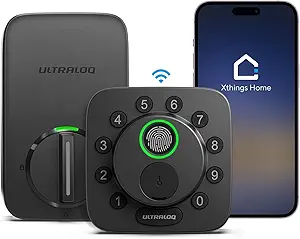 | Best for Smart Home Integration | Access Methods: Fingerprint (50), passcodes (50), app, web portal, eKeys, voice, 2 keys | Connectivity: Built-in 2.4GHz Wi-Fi, Matter over Thread | Voice Assistants: Siri, Alexa, Google Assistant | VIEW LATEST PRICE | See Our Full Breakdown |
| Wyze Palm Lock Smart Door Lock with Palm Vein Recognition and Keypad |  | Best Hands-Free Entry | Unlock Methods: Palm vein recognition, keypad, mechanical key | Access Codes: Up to 50 unique or one-time guest codes | Battery Life: 6 months main, 2 weeks secondary | VIEW LATEST PRICE | See Our Full Breakdown |
| Schlage Encode Smart WiFi Deadbolt Lock with Century Trim, Matte Black |  | Best Build Quality and Security Certification | Connectivity: Built-in WiFi | Access Codes: Up to 100 | Voice Assistants: Alexa, Google Home | VIEW LATEST PRICE | See Our Full Breakdown |
| Philips Wi-Fi Smart Deadbolt Lock Set with Keypad and Handles |  | Best Complete Handle Set Replacement | Model: DDL240X-1HW-H2 | Connectivity: Wi-Fi | Unlock Methods: App, fingerprint, PIN code, key, voice | VIEW LATEST PRICE | See Our Full Breakdown |
| eufy Security Smart Lock C220, Fingerprint Keyless Entry Door Lock |  | Best Battery Life | Brand: eufy Security | Model Number: T8506 | Unlock Methods: 6 (fingerprint, app, keypad, physical key, Apple Watch, voice assistant) | VIEW LATEST PRICE | See Our Full Breakdown |
| Schlage Encode Smart WiFi Deadbolt Lock with Century Trim, Satin Nickel |  | Best for Rentals and Multi-User Households | Finish: Satin Nickel | Connectivity: Built-in WiFi, no hub required | Voice Assistants: Alexa, Google Home | VIEW LATEST PRICE | See Our Full Breakdown |
| Yale Assure Lock 2 WiFi Smart Lock Deadbolt with Keypad, Keyless Entry, Black Suede |  | Best for Scheduling and Smart Automation | Brand: Yale | Model: Assure Lock 2 | Color: Black Suede | VIEW LATEST PRICE | See Our Full Breakdown |
| Philips 4200 Series WiFi Keypad Deadbolt with Handle |  | Best Complete Front Door Upgrade | Series: Philips 4200 Series | Connectivity: Built-in 2.4GHz WiFi (no hub required) | Fingerprint Unlock Speed: 0.3 seconds | VIEW LATEST PRICE | See Our Full Breakdown |
| Wyze Auto-Lock Bolt v2 Fingerprint Keyless Entry Smart Lock |  | Best Budget Fingerprint Pick | Brand: Wyze | Model Number: WLCKB2 | Unlock Methods: Fingerprint, app, keypad code, physical key | VIEW LATEST PRICE | See Our Full Breakdown |
| smart lock | Connectivity |
|---|---|
| eufy Security FamiLock S3 Max | — |
| Tapo DL110 Smart Wi-Fi Deadbol | — |
| Aqara UWB Smart Lock U400 with | Matter over Thread |
| Philips WiFi Keypad Door Lock | Built-in WiFi |
| Philips 4200 Series WiFi Keypa | 2.4GHz WiFi (no hub required) |
| Philips Wi-Fi Smart Deadbolt L | Built-in Wi-Fi (2.4GHz only) |
| ULTRALOQ Bolt SE Wi-Fi Smart L | Built-in 2.4GHz Wi-Fi, Matter over Thread |
| Wyze Palm Lock Smart Door Lock | Wi-Fi |
| Schlage Encode Smart WiFi Dead | Built-in WiFi |
| Philips Wi-Fi Smart Deadbolt L | Wi-Fi |
| eufy Security Smart Lock C220 | Built-in Wi-Fi, no bridge required |
| Schlage Encode Smart WiFi Dead | Built-in WiFi, no hub required |
| Yale Assure Lock 2 WiFi Smart | Wi-Fi (2.4 or 5 GHz, no hub required) |
| Philips 4200 Series WiFi Keypa | Built-in 2.4GHz WiFi (no hub required) |
| Wyze Auto-Lock Bolt v2 Fingerp | — |
More Details on Our Top Picks
eufy Security FamiLock S3 Max Video Smart Lock with Palm Vein Recognition
This option stands out for folding three devices into one: a 2K camera, a video doorbell, and a palm-vein smart lock. Palm vein recognition is harder to spoof than fingerprints because it reads patterns beneath the skin, and it works in 0.6 seconds with all data stored locally — no subscription and no cloud footage. The rear indoor video screen is the real differentiator; compared with the Tapo DL110 or the Aqara U400, which force everyone through a phone app, kids and older relatives can see who’s at the door app-free. The tradeoff is complexity: full features demand the eufy app, camera streams don’t work through Matter, and HomeBase 2 owners are left behind. Battery life also trails the Tapo’s year-long claim.
Pros:- Palm vein unlock is nearly impossible to forge and stores data locally
- Combines camera, doorbell, and lock in one device
- Indoor screen works for kids and elderly family without a smartphone
- Rechargeable battery plus AAA backup prevents lockouts
Cons:- Camera streaming not supported via Matter; full functionality requires the eufy app
- Incompatible with HomeBase 2
- 4-month battery life is shorter than keypad-only rivals
Best for: Homeowners who want a camera, doorbell, and lock in a single unit and refuse to pay monthly storage fees
Not ideal for: Renters or minimalists who only need a deadbolt — it’s bulky and its best features sit behind the eufy app
- Unlock Method:Palm vein recognition (0.6 seconds)
- Camera Resolution:2K HD
- Field of View:150° head-to-toe
- Battery:Rechargeable (up to 4 months) + 4 AAA backup
- Compatibility:eufy HomeBase 3, Matter, Apple Home, Google Home, Alexa, SmartThings
- Data Storage:Local
- Indoor Display:Rear lock video screen (app-free)
Our verdict“Buy it if you want front-door surveillance and entry control in one purchase; skip it if you just need a simple connected deadbolt.”
Tapo DL110 Smart Wi-Fi Deadbolt Door Lock with Fingerprint Recognition
Where the eufy S3 Max piles on cameras and screens, the Tapo DL110 does one thing extremely well: reliable entry with minimal charging hassle. Its USB-C rechargeable battery is rated for up to a year in Wi-Fi mode and two years in Bluetooth mode — far beyond the Philips DDL242X’s six months on disposable AAs. With six access methods and a 0.42-second fingerprint sensor supporting up to 100 prints, it handles busy households and rental properties without breaking a sweat. Compared with the Philips models, it trades voice-assistant breadth (no Apple Home) for sheer endurance. The honest caveat: those battery figures come from lab conditions, and fingerprint accuracy can slip when dozens of prints are registered or hands are wet.
Pros:- Up to 1 year of battery life per USB-C charge (2 years in Bluetooth mode)
- Six access methods including a fast 0.42-second fingerprint sensor
- Supports 100 fingerprints plus permanent, one-time, and scheduled codes
- Includes all tools for straightforward DIY installation
Cons:- Battery estimates reflect lab testing and real-world results vary
- Fingerprint speed and accuracy can degrade with many registered prints or poor conditions
Best for: Landlords and large households who want set-and-forget battery life and many fingerprint users
Not ideal for: Apple-centric smart homes — there’s no HomeKit or Apple Home support here
- Lock Type:Deadbolt
- Access Methods:Fingerprint, keypad passcode, Wi-Fi, Bluetooth, smart home assistant, backup key
- Fingerprint Recognition Time:0.42 seconds
- Max Registered Fingerprints:100
- Battery Life:Up to 1 year (Wi-Fi), up to 2 years (Bluetooth)
- Charging:USB-C
- Smart Home Compatibility:Alexa, Google Home, SmartThings
- Access Code Types:Permanent, one-time, scheduled
Our verdict“This is the pick for anyone tired of recharging or replacing lock batteries every few months.”
Aqara UWB Smart Lock U400 with Apple Home Key and Fingerprint, Black
The Aqara U400 is better suited to buyers deep in the Apple ecosystem than anything else in this lineup. Its hands-free UWB unlocking opens the door as you approach with a supported iPhone or Apple Watch — no touch, no code — and Apple Home Key lets household members tap in even with a dead phone battery. Unlike the Tapo DL110, it also speaks Matter over Thread, so it plays nicely with multiple platforms. Build quality holds up its end too, with BHMA certification and an IP65 exterior for exposed doorways. The tradeoffs are real: UWB and Home Key demand a Thread-enabled Apple hub and current devices, and the NFC card costs extra. At six months per charge, battery life sits in the middle of the pack behind the Tapo.
Pros:- Hands-free UWB unlocking with supported Apple devices
- Apple Home Key works even when a phone battery is dead
- Matter over Thread support spans multiple smart home platforms
- BHMA-certified build with IP65 weather resistance
Cons:- UWB and Home Key require a Thread-enabled Apple hub and compatible devices
- NFC card sold separately
- Six-month battery life trails the Tapo DL110
Best for: Apple Households with a HomePod or Apple TV hub that want hands-free, walk-up entry
Not ideal for: Android-only households — the flagship UWB and Home Key features simply won’t work
- Unlocking Methods:UWB, Apple Home Key, fingerprint, passcode, voice, app, NFC card (sold separately), physical key
- Connectivity:Matter over Thread
- Battery:Removable rechargeable lithium; up to 6 months per charge
- Charging:USB-C
- Security Certification:BHMA-certified
- Weather Resistance:IP65-rated exterior
- Additional Features:Auto Lock, Night Latch Mode, Do Not Disturb Mode, rekeyable design
Our verdict“If your home runs on Apple, this is the most seamless entry experience here; everyone else should look at the Tapo or Philips options.”
Philips WiFi Keypad Door Lock with Handle, App-Controlled Smart Deadbolt
Compared with its 4200 Series sibling, the Philips DDL242X skips the fingerprint sensor and doubles down on durability. It’s rated from -31°F to 150°F, so it shrugs off Midwest winters and desert summers that can trouble cheaper locks, and its IP54 housing handles 2200N of pressure. Built-in Wi-Fi means no hub, and the four entry methods — voice, keypad, app, key — cover the basics most buyers actually use. With up to 100 customizable passwords including timed and one-time codes, it’s a sensible rental-property choice. The compromises: no fingerprint unlocking like the Tapo DL110 or Philips 4200, and it burns through eight AA batteries (not included) in roughly six months, which costs more over time than the Tapo’s rechargeable pack.
Pros:- Wide -31°F to 150°F operating range with IP54 water resistance
- Built-in Wi-Fi for remote control without a hub
- Up to 100 passwords with permanent, one-time, and timed options
- Installs on standard US doors in about 15 minutes
Cons:- Requires 8 AA batteries that are not included
- Six-month battery life trails rechargeable competitors like the Tapo DL110
- No fingerprint unlocking
Best for: Homeowners in extreme climates who want a weatherproof keypad lock with remote access and no hub
Not ideal for: Anyone who wants fingerprint entry — this model is keypad, app, voice, and key only
- Model:DDL242X-15HW-L
- Connectivity:Built-in WiFi
- Unlock Methods:Voice (Alexa/Google), passcode, key, mobile app
- Password Capacity:Up to 100 custom passwords
- Power Source:8 AA batteries (not included)
- Battery Life:Up to 6 months
- Operating Temperature:-31°F to 150°F (-35°C to 66°C)
- Water Resistance:IP54
- Warranty:24 months
Our verdict“A weatherproof, hub-free keypad lock for tough climates — just budget for batteries and skip it if you want biometrics.”
Philips 4200 Series WiFi Keypad Door Lock with Handle, Satin Nickel
This model makes the most sense for short-term rental operators. Its 0.3-second fingerprint unlock is the fastest biometric speed in this batch — quicker than both the Tapo DL110 and Aqara U400 — and its passcode system is built for turnover, with permanent, one-time, periodic, and recurring codes that let you grant a guest access for exactly their stay. Unlike the DDL242X, it adds that fingerprint layer while keeping hub-free 2.4GHz Wi-Fi and a matching handle set for a complete, coordinated front-door upgrade with just a screwdriver. The downsides mirror its sibling: eight AA batteries aren’t included, and dual-band router owners should confirm their network broadcasts 2.4GHz, since 5GHz-only setups won’t connect.
Pros:- Fast 0.3-second fingerprint unlock
- Flexible code types (one-time, periodic, recurring) tailored to rentals
- Direct Wi-Fi with no hub or bridge required
- Includes matching handle set and installs with a screwdriver
Cons:- Requires 8 AA batteries that are not included
- Only compatible with 2.4GHz Wi-Fi networks
- Disposable batteries cost more long-term than rechargeable rivals
Best for: Airbnb hosts and multi-guest households who need granular, expiring access codes plus fast fingerprint entry
Not ideal for: Homes with 5GHz-only Wi-Fi setups — it connects exclusively to 2.4GHz networks
- Series:Philips 4200 Series
- Connectivity:2.4GHz WiFi (no hub required)
- Unlock Methods:Fingerprint, PIN code, App, Voice
- Fingerprint Unlock Speed:0.3 seconds
- Voice Assistants:Alexa, Google Assistant
- Auto-Lock Timer:0-180 seconds
- Batteries:8 AA alkaline (not included)
- Finish:Satin Nickel
Our verdict“The strongest choice here for rental hosts who live on guest codes and want fingerprint speed on top.”
Philips Wi-Fi Smart Deadbolt Lock with Keyless Entry
Where the Philips Wi-Fi Smart Deadbolt earns its spot is code flexibility: up to 100 custom passcodes that can be one-time, scheduled, or recurring. Compared with the Schlage Encode, which also supports 100 codes, this model adds fingerprint unlocking and voice control at a similar DIY difficulty level, making daily entry faster for household members who don’t want to punch in digits.
The tradeoffs are real, though. Unlike the ULTRALOQ Bolt SE with its 18-month battery life and IP65 weatherproofing, this lock lacks a stated weather rating and ships without batteries — you’ll need AA alkalines specifically. The 2.4GHz-only Wi-Fi with a 65-foot router range limit also means buyers with larger homes may need a closer access point.
Pros:- Five unlock methods including fingerprint and voice via Alexa/Google Assistant
- Up to 100 custom, one-time, and scheduled passcodes for guests
- Remote lock/unlock over built-in Wi-Fi with no hub required
- Screwdriver-only DIY installation on doors 1-3/8″ to 2″ thick
Cons:- Batteries not included and restricted to AA alkaline only
- 2.4GHz-only Wi-Fi with a ~65 ft router range limit
- No door sensor included, so no open/ajar alerts
Best for: Landlords and Airbnb hosts who juggle dozens of rotating guest codes and want fingerprint entry for themselves
Not ideal for: Homeowners with far-flung routers or mesh networks on 5GHz only — connectivity will frustrate
- Unlock Methods:App, passcode, fingerprint, physical key, voice
- Connectivity:Built-in Wi-Fi (2.4GHz only)
- Passcode Capacity:Up to 100 custom codes
- Auto-Lock Timer:10 to 180 seconds
- Door Thickness:1-3/8″ to 2″ (38-50mm)
- Batteries:AA alkaline (not included)
- Voice Assistants:Alexa, Google Assistant
Our verdict“A strong pick if managing guest access is your priority, provided your router is close enough and you stock AA batteries.”
ULTRALOQ Bolt SE Wi-Fi Smart Lock with Matter over Thread
This option stands out for Matter over Thread support, which no other lock in this lineup offers. If your home runs Apple Home, Alexa, and Google devices side by side, the Bolt SE talks to all of them through a single standard — a genuine advantage over the Schlage Encode or Wyze Palm Lock, which lock you into their respective app ecosystems. The self-healing Thread mesh also means fewer dropouts than plain 2.4GHz Wi-Fi locks.
Battery life is the other headline: up to 18 months, roughly three times what the Schlage Encode delivers. The catch is that Thread features require a compatible Thread Border Router, so buyers starting from scratch will need to factor in that hub cost. And like most budget smart locks here, it’s 2.4GHz only with no door sensor included.
Pros:- Matter over Thread works across Siri, Alexa, and Google Assistant
- Up to 18 months of battery life
- ANSI BHMA certified with IP65 weather resistance
- 7-in-1 access: fingerprint (up to 50), 50 passcodes, app, web portal, eKeys, voice, keys
Cons:- Thread features require a separate compatible Thread Border Router
- 2.4GHz only, with router recommended within 70 ft
- No door sensor included
Best for: Smart home enthusiasts with mixed ecosystems (Apple Home plus Alexa or Google) who want one lock that bridges them all
Not ideal for: Buyers with no Thread Border Router and no plans to add one — the headline feature becomes redundant
- Access Methods:Fingerprint (50), passcodes (50), app, web portal, eKeys, voice, 2 keys
- Connectivity:Built-in 2.4GHz Wi-Fi, Matter over Thread
- Voice Assistants:Siri, Alexa, Google Assistant
- Battery Life:Up to 18 months
- Weather Resistance:IP65 Waterproof
- Certification:ANSI BHMA Certified
- Installation:DIY, approximately 10 minutes
- Warranty:Lifetime mechanical, 18-month electronic
Our verdict“The clear choice for multi-platform smart homes that want future-proof connectivity and long battery life.”
Wyze Palm Lock Smart Door Lock with Palm Vein Recognition and Keypad
The Wyze Palm Lock takes the biometric idea further than fingerprint locks like the eufy C220 or Philips deadbolts: palm vein recognition reads patterns under your skin, so it works contactlessly and isn’t fooled by smudges, wet fingers, or gloves-off struggles. For anyone carrying groceries, this is genuinely faster entry than any keypad in the roundup.
The dual-battery system is clever — a primary battery plus a two-week secondary, with USB-C emergency charging — though you’ll need to supply your own power bank if both run flat. Compared with the ULTRALOQ Bolt SE’s 18-month runtime, the six-month main battery is shorter, and the IP53 rating is a step below the Bolt SE’s IP65, so exposed storm doors are riskier. Tamper and door-ajar alarms partly make up for the missing door sensor on rivals.
Pros:- Contactless palm vein recognition is faster and more reliable than fingerprint readers
- Dual-battery system with USB-C emergency charging prevents lockouts
- Up to 50 guest codes with anti-peep PIN protection
- Built-in tamper alarm and door ajar alarm
Cons:- Emergency charging requires you to supply your own power bank
- Palm recognition can struggle in extreme weather
- Only IP53 weather resistance, below the ULTRALOQ’s IP65
Best for: Busy households who want fast, contactless entry with their hands full and don’t want to fumble with codes
Not ideal for: Homes with fully exposed entry doors in harsh climates — IP53 weather resistance and cold-weather palm reads are less reliable
- Unlock Methods:Palm vein recognition, keypad, mechanical key
- Access Codes:Up to 50 unique or one-time guest codes
- Battery Life:6 months main, 2 weeks secondary
- Emergency Charging:USB-C port (power bank compatible)
- Connectivity:Wi-Fi
- Weather Resistance:IP53
- Certification:BHMA Grade 3
- Auto Lock:Yes, gyroscope-based door sensing
Our verdict“The most futuristic entry experience in this price tier, best suited to sheltered doors and convenience-first buyers.”
Schlage Encode Smart WiFi Deadbolt Lock with Century Trim, Matte Black
Schlage’s reputation here rests on hardware, not gimmicks. The Encode carries the highest BHMA residential Security, Durability, and Finish ratings — a certification tier above the Wyze Palm Lock’s Grade 3 — plus a built-in alarm and a fingerprint-resistant touchscreen. If your priority is a lock that survives pry attempts and decade-scale wear, this model makes the most sense over app-focused rivals.
Compared with the Philips Wi-Fi Smart Deadbolt, you give up fingerprint unlocking entirely — it’s codes, app, voice, and key only — but you gain batteries included and compatibility with both the Schlage Home and Key by Amazon apps, the latter enabling in-garage Amazon deliveries. The roughly six-month battery life is the main ongoing annoyance, especially next to the ULTRALOQ Bolt SE’s 18 months.
Pros:- Highest BHMA residential Security, Durability, and Finish certification
- Built-in alarm and fingerprint-resistant touchscreen
- Batteries included, works with Schlage Home and Key by Amazon apps
- Screwdriver-only installation in minutes
Cons:- Roughly six-month battery life requires periodic replacement
- No fingerprint or biometric unlock option
- Advanced features depend entirely on app and Wi-Fi connectivity
Best for: Security-focused homeowners who value certified durability and trusted brand hardware over biometric features
Not ideal for: Anyone who wants fingerprint or palm-based entry — this lock is keypad and app only
- Connectivity:Built-in WiFi
- Access Codes:Up to 100
- Voice Assistants:Alexa, Google Home
- Door Thickness:1-3/8 in to 1-3/4 in
- Backset:2-3/8 in or 2-3/4 in
- Power:4 AA batteries (included), up to 6 months
- Backup Key:1 included
- Certification:BHMA highest residential Security, Durability, Finish
Our verdict“The most credibly hardened lock in this batch for buyers who put certified security above feature count.”
Philips Wi-Fi Smart Deadbolt Lock Set with Keypad and Handles
Most locks in this roundup replace only the deadbolt, leaving you with a mismatched old handle below. The Philips DDL240X-1HW-H2 solves that by bundling a matching handle set with the smart deadbolt — a small thing that matters a lot if you’re refreshing a front entrance. Compared with the standalone Philips Wi-Fi Smart Deadbolt, you get similar five-way unlocking and 100-code capacity, but batteries are included this time.
The flexible PIN system (one-time, temporary, recurring, permanent) handles everything from delivery drivers to dog sitters. Tradeoffs: you must verify your door is 35-50mm thick before buying, since the paired handle set narrows compatibility, and phone support is limited to weekdays and Saturdays — worse than the round-the-clock expectations set by Schlage or ULTRALOQ.
Pros:- Bundled matching handle set creates a coordinated entry look
- Five unlock methods including fingerprint and voice control
- One-time, temporary, recurring, and permanent PIN options for guests and deliveries
- Batteries included and installs with just a screwdriver
Cons:- Requires confirming 35-50mm door thickness compatibility before purchase
- Phone customer support limited to weekdays and Saturdays
Best for: Homeowners doing a full entryway refresh who want the deadbolt and handle to match and work together
Not ideal for: Rental property swappers or anyone with unusual door hardware — the integrated handle set demands careful fit checking
- Model:DDL240X-1HW-H2
- Connectivity:Wi-Fi
- Unlock Methods:App, fingerprint, PIN code, key, voice
- User PIN Codes:Up to 100 plus unlimited one-time PINs
- Auto-Lock Timer:30 to 180 seconds
- Door Thickness:35-50mm
- Batteries:4 (included)
- Includes:Door lock, handle set, 4 batteries
Our verdict“The easiest way to upgrade an entire entryway in one purchase, as long as your door measurements check out.”
eufy Security Smart Lock C220, Fingerprint Keyless Entry Door Lock
The eufy C220 earns its spot with the most generous power management in this lineup: roughly 8 months on 8 AA batteries, which means fewer mid-winter battery swaps than the Schlage Encode or Yale Assure Lock 2, both of which are rated closer to six months. Its self-learning fingerprint reader delivers sub-second access once trained, and the built-in Wi-Fi means there’s no bridge cluttering an outlet near the door. Compared with the Wyze Lock Bolt v2, which matches the 8-month battery claim, the eufy pulls ahead on unlock flexibility — six methods including Apple Watch and voice assistants versus Wyze’s four. The tradeoff is that the AI fingerprint system needs a learning period, so early reads can take a few attempts, and heavy daily use will shorten that battery estimate. For buyers who want to install a lock and mostly forget about it, this is the pick that demands the least attention.
Pros:- Six unlock methods including sub-second fingerprint, Apple Watch, and voice assistants
- Built-in Wi-Fi with remote control and no separate bridge required
- Up to 8 months of battery life on 8 AA batteries
- Tool-free installation on most standard deadbolts in about 15 minutes
Cons:- Self-learning fingerprint reader may need several attempts while it trains
- Real-world battery life shrinks with high-frequency use
Best for: Homeowners who hate frequent battery changes and want fingerprint speed with six ways in
Not ideal for: Impatient first-time users — the fingerprint AI needs training attempts before it reads reliably
- Brand:eufy Security
- Model Number:T8506
- Unlock Methods:6 (fingerprint, app, keypad, physical key, Apple Watch, voice assistant)
- Battery Life:Approximately 8 months (8 AA batteries)
- Connectivity:Built-in Wi-Fi, no bridge required
- Certification:BHMA Grade 3 (100,000+ cycles)
- Operating Temperature:-22°F to 158°F (-30°C to 70°C)
- Installation Time:Approximately 15 minutes, no drilling required
Our verdict“This is the lock for buyers who want set-and-forget battery life plus fast biometric entry without monthly upkeep anxiety.”
Schlage Encode Smart WiFi Deadbolt Lock with Century Trim, Satin Nickel
Where the eufy C220 leads on biometrics, the Schlage Encode dominates on code management: up to 100 unique access codes, each assignable, revocable, and trackable from anywhere. That capacity is why this model makes sense for short-term rental hosts and property managers — the Wyze Lock Bolt v2 caps out at 50 codes or fingerprints, and the Encode’s fingerprint-resistant touchscreen keeps codes from wearing into ghost patterns that guests could read. Schlage also holds the BHMA highest residential security rating in this batch, plus a built-in forced-entry alarm the eufy and Wyze locks don’t match. The tradeoffs are real, though: there’s no fingerprint option at all, battery life tops out around six months, and the full remote feature set lives entirely inside the Schlage Home app and its Wi-Fi connection. If biometric speed matters more than code volume, skip this one for the eufy.
Pros:- Supports up to 100 access codes for guests, cleaners, and staff
- Built-in Wi-Fi with no hub required for remote locking and monitoring
- BHMA highest residential security, durability, and finish rating
- Fingerprint-resistant touchscreen with built-in forced-entry alarm
Cons:- Four AA batteries need replacing roughly every six months
- Full feature set depends on the Schlage Home app and a stable Wi-Fi connection
Best for: Airbnb hosts and landlords managing many guests who need dozens of expiring codes
Not ideal for: Anyone wanting fingerprint entry — this lock is keypad, app, and backup key only
- Finish:Satin Nickel
- Connectivity:Built-in WiFi, no hub required
- Voice Assistants:Alexa, Google Home
- Max Access Codes:100
- Battery:4 AA batteries (included), up to 6 months
- Door Thickness:1-3/8 in to 1-3/4 in
- Certification:BHMA highest residential Security, Durability and Finish rating
Our verdict“The Encode is the code-management workhorse for anyone juggling many users who need separate, trackable entry codes.”
Yale Assure Lock 2 WiFi Smart Lock Deadbolt with Keypad, Keyless Entry, Black Suede
The Yale Assure Lock 2 stands out for what happens after someone enters: unlimited codes with schedules and expiration dates, Auto-Unlock that detects your approach, and DoorSense auto-locking that confirms the door actually closed. Compared with the Schlage Encode, which caps at 100 codes, Yale’s unlimited scheduling makes it better suited to busy households with rotating cleaners, dog walkers, and contractors. It’s also the only lock here with BHMA Grade 2 certification — a step above the Grade 3 rating on the eufy C220 — and it handles thick doors up to 2-1/4 inches that other models can’t fit. The compromises: no fingerprint reader despite the higher price tier, periodic battery replacements, and an app restricted to the US and Canada, which rules it out for international buyers. For automation-first households, though, nothing else in this group schedules access as precisely.
Pros:- Unlimited access codes with custom schedules and expiration
- Auto-Unlock and DoorSense auto-lock for hands-free daily use
- BHMA Grade 2 build, a durability step above Grade 3 locks like the eufy C220
- Fits thick doors from 1-3/4″ to 2-1/4″ with direct 2.4 or 5 GHz Wi-Fi
Cons:- App functionality is limited to the US and Canada only
- No fingerprint entry despite the premium positioning
Best for: Smart-home households that want granular access schedules plus auto-lock and auto-unlock automation
Not ideal for: Buyers outside the US and Canada — the Yale Access app simply won’t function there
- Brand:Yale
- Model:Assure Lock 2
- Color:Black Suede
- Connectivity:Wi-Fi (2.4 or 5 GHz, no hub required)
- Entry Methods:Keypad, app/Apple Watch, auto-unlock, backup key
- Certification:BHMA Grade 2
- Operating Temperature:-22°F to 140°F
- Door Fit:1-3/4″ to 2-1/4″ thick, 2-1/8″ bore hole
Our verdict“If your priority is scheduled, automated access rather than biometric speed, the Assure Lock 2 is the most capable scheduler here.”
Philips 4200 Series WiFi Keypad Deadbolt with Handle
Most locks in this roundup replace only the deadbolt, leaving you with a mismatched old handle below. The Philips 4200 Series is the only pick that ships as a matched deadbolt-and-handle set, making it the clear choice for a full cosmetic and functional refresh of a front door. Its 0.3-second fingerprint reader is technically the fastest in this batch — quicker than the eufy C220 and the Wyze Lock Bolt v2 — and its flexible code types (one-time, periodic, recurring) suit guest-heavy households almost as well as the Schlage Encode does. The catch list is longer than average, though: batteries aren’t included, lithium and rechargeable cells aren’t supported, the lock needs to sit within about 33 feet of your router on 2.4GHz, and auto-lock ships switched off. Buyers with a distant front door or a 5GHz-only network should look elsewhere.
Pros:- Complete matched set includes both deadbolt and handle for a uniform look
- Fastest fingerprint reader in this batch at 0.3 seconds
- One-time, periodic, and recurring passcodes for guests and rentals
- Direct 2.4GHz Wi-Fi connection with no hub required
Cons:- Batteries not included, and rechargeable or lithium cells are unsupported
- Auto-lock is disabled by default and must be manually enabled
- Requires proximity within roughly 33 ft of a 2.4GHz router
Best for: Homeowners replacing an entire entry set who want a matching handle and deadbolt in one purchase
Not ideal for: Homes whose front door sits far from the router — the 33 ft 2.4GHz range limit can cause dropouts
- Series:Philips 4200 Series
- Connectivity:Built-in 2.4GHz WiFi (no hub required)
- Fingerprint Unlock Speed:0.3 seconds
- Voice Assistants:Alexa, Google Assistant
- Auto-Lock Timer:0–180 seconds (off by default)
- Battery Life:Up to 6 months (1.5V alkaline, not included)
- Door Thickness:1-3/8″ to 1-3/4″ (38mm to 50mm)
- Door Orientation:Right-opening default, reversible
Our verdict“This is the one-box solution for buyers who care what the whole entry looks like, not just the deadbolt.”
Wyze Auto-Lock Bolt v2 Fingerprint Keyless Entry Smart Lock
For buyers who want fingerprint entry and built-in Wi-Fi without paying premium prices, the Wyze Lock Bolt v2 delivers the essentials with few frills. Its AI self-learning scanner mirrors the approach of the eufy C220 — recognition genuinely improves over the first weeks — and the 8-month battery life matches eufy’s, easily outlasting the six-month ratings on the Schlage Encode and Philips 4200. A USB-C emergency power port is a thoughtful backup the others lack, and integration with Wyze’s video doorbell makes it a natural fit for an existing Wyze ecosystem. The tradeoffs are ecosystem lock-in and capacity: 50 total codes or fingerprints is half the Schlage’s 100-code ceiling, remote features depend entirely on the Wyze app and Wi-Fi, and there’s no rechargeable battery option. If you already own Wyze cameras, this slotting into one app is a genuine advantage rather than a limitation.
Pros:- AI self-learning fingerprint scanner that improves speed and accuracy with use
- 8-month battery life matching the eufy C220, with USB-C emergency backup power
- Built-in Wi-Fi with remote control and Wyze Video Doorbell integration
- Four unlock methods including app, keypad, and physical backup keys
Cons:- Capped at 50 total codes or fingerprints, half the Schlage Encode’s capacity
- No rechargeable battery option — 8 AA cells required
- Remote features depend entirely on Wi-Fi and the Wyze app ecosystem
Best for: Budget-minded buyers, especially those already running Wyze cameras or doorbells
Not ideal for: Households needing more than 50 codes — the capacity cap rules out larger rental operations
- Brand:Wyze
- Model Number:WLCKB2
- Unlock Methods:Fingerprint, app, keypad code, physical key
- Fingerprint Unlock Speed:0.5 seconds
- Code/Fingerprint Capacity:50
- Battery Life:Up to 8 months (8 AA batteries included)
- Emergency Power:USB-C port
- Weather Resistance:IP53
Our verdict“The most sensible low-stress entry point into fingerprint smart locks, especially if Wyze already runs your home.”

How We Picked
I evaluated each lock against five buyer-relevant criteria: unlock method versatility (how many ways you can get in, and how fast each one works), connectivity and ecosystem compatibility (Wi-Fi, Thread, Matter, Apple Home Key, Alexa, and Google support), physical security and build quality (deadbolt construction, ANSI grading where available, anti-tamper design), power management (battery type, expected life, and backup entry if power dies), and installation fit (whether it works on standard US deadbolt prep or needs a full handle set replacement).
The ranking rewards locks that solve real household problems — shared access, kids coming home from school, hands-full entry — rather than piling on gimmicks. That is why biometric locks with proven palm and fingerprint tech sit at the top, Matter-ready models rank highly for longevity, and keypad-only deadbolts fill the value tier. Price was considered as a value question, not an absolute one: a lock earning its cost through durability or versatility can outrank a cheaper model that cuts corners on connectivity or build.
Factors to Consider When Choosing Best Smart Locks
Before settling on a specific lock, it helps to understand the bigger decisions that shape your experience for years after installation. These are the factors that separate a lock you love from one you fight with.
Match the Unlock Method to Your Household
The unlock method is the single biggest satisfaction driver, and the wrong choice becomes a daily frustration. Fingerprint readers are fast and personal but struggle with kids whose prints change and seniors with worn ridges — palm vein recognition solves this by reading veins under the skin, which works regardless of surface conditions, wet hands, or age. Keypads remain the most democratic option because codes can be shared, scheduled, and deleted, making them better for rentals, dog walkers, and guests than any biometric. If your household includes children or elderly parents, I would prioritize palm or keypad entry over fingerprint-only designs. Households with frequent guests should insist on app-managed codes rather than a single shared PIN. The best locks offer multiple methods precisely because no single one fits every member of a real family.
Connectivity Determines Smart Home Longevity
A common mistake is buying a lock that only works with one ecosystem, then changing phones three years later and losing half its features. Wi-Fi locks work with any router and support remote control out of the box, but they drain batteries faster and often depend on a proprietary cloud. Matter over Thread, as on the ULTRALOQ Bolt SE, is the current gold standard for future-proofing because any certified assistant can control it locally, without cloud dependency. Apple Home Key locks like the Aqara U400 offer the smoothest hands-free experience if everyone in the house carries an iPhone — and a complete dead end if anyone carries Android. Check not just what platforms a lock supports today, but whether its app requires a subscription for features like notification history, because those fees add up over a lock’s lifespan.
Full Handle Sets vs. Deadbolt Replacements
Several locks in this category, including multiple Philips models, ship as complete handle-and-deadbolt sets, while others replace only the deadbolt and leave your existing lever or knob in place. Handle sets look cleaner and guarantee a matching finish, but they demand more work at installation and lock you into that brand’s aesthetics. Deadbolt-only replacements install in under an hour on standard US door prep and keep your options open. A frequent buyer error is ordering a handle set for a door with non-standard spacing or a mortise latch, only to find it does not fit — measure your backset, cross bore, and door thickness before ordering anything. Also confirm whether the lock is one-sided or has an exterior keyway backup, because a fully keyless design means a dead battery equals a locked-out family member unless there is a 9V terminal or physical override.
Battery Reality Check
Manufacturer battery-life claims deserve healthy skepticism, because real-world usage with auto-lock, motion alerts, and video features can cut stated figures by half. Locks with rechargeable batteries, like the eufy and Wyze palm-vein models, save money on replacements but fail abruptly when you forget to charge them. AA-powered locks degrade more gracefully and let you swap in fresh cells from a drawer in seconds. Always check whether the lock has a backup power port, and set low-battery notifications in the app on day one rather than after the first lockout. If you are choosing a lock with a camera or always-listerving features, budget for charging every one to three months, not the six to twelve months simpler locks achieve. Households with only one entrance should weight battery reliability more heavily than any convenience feature.
Security Substance Over Feature Count
A lock with ten unlock methods but a flimsy deadbolt is worse than a dumb lock done well. Look for ANSI/BHMA certification, solid metal construction, and anti-peep keypad designs that let you add random digits before your real code. Biometric data handling matters too — locks that store fingerprint and palm templates locally on the device rather than in the cloud are safer against server breaches, which is a genuine differentiator between brands in this lineup. Built-in cameras and doorbell features are convenient but add privacy considerations, especially at rental properties or shared entrances. Finally, an alarm on repeated wrong attempts is one of the most underrated features for deterring code-guessing. The premium locks here justify their cost through construction; the budget ones earn their place by not pretending otherwise.
When to Pay More — and When Not To
Paying more makes sense when you need biometrics for unreliable fingerprints, Matter for a mixed smart home, or a camera for package theft — these are functional upgrades that change daily behavior. It does not make sense to pay premium prices for features you will disable, like remote access for a vacation cabin with no Wi-Fi. Renters should generally cap spending at the mid tier, since locks move with you but door hardware rules may not allow full replacement. First-time smart lock buyers are often better served by a simple keypad deadbolt like the Schlage Encode, learning their actual usage patterns before investing in palm-vein tech. The pattern across this roundup is clear: the gap between mid-range and premium is about convenience features, while the gap between cheap and mid-range is about build quality — and only one of those gaps is worth skipping.
Frequently Asked Questions
Is palm vein recognition actually better than a fingerprint reader?
For most households, yes — palm vein systems read the vein pattern beneath your skin using near-infrared light, so they work with wet hands, gloves off, worn fingerprints, and children whose prints are still developing. Fingerprint readers are slightly faster and cheaper, and they remain perfectly adequate for adults with well-defined prints. In this lineup, the eufy FamiLock S3 Max and Wyze Palm Lock offer palm recognition at very different price points, while the Aqara U400, eufy C220, and Wyze Auto-Lock Bolt v2 use fingerprints. If your household includes kids under ten or anyone whose prints fail on phones, the palm-vein premium pays for itself in daily reliability. If not, a good fingerprint lock delivers 95% of the experience for less money.
Do I need a smart home hub for these locks to work?
It depends entirely on the radio inside the lock. Wi-Fi models — the Philips lineup, Schlage Encode, Yale Assure Lock 2, and ULTRALOQ’s Wi-Fi variants — connect straight to your home router and need no hub, though features run through each brand’s cloud app. The ULTRALOQ Bolt SE with Matter over Thread needs a Thread border router, which an Apple TV, HomePod, or newer Echo and Nest Hub already provides, so many smart homes have one without realizing it. Locks with Apple Home Key, like the Aqara U400, work best inside the Apple ecosystem but still function standalone via their own app. My advice: check what you already own before ruling a lock out, and treat proprietary hubs as a last resort since they add cost and a single point of failure.
What happens if the battery dies while I’m locked out?
Every reputable lock in this category has a backup plan, but they differ in convenience. The most common is a 9V battery terminal on the bottom of the exterior assembly — you touch a square battery to it, which powers the keypad long enough to enter a code. Some models retain a hidden physical keyway, which is the most foolproof option and worth prioritizing if you live alone or have only one entrance. Full keyless designs without any override exist at the budget end and are a genuine lockout risk for disorganized households. Whatever you choose, enable the app’s low-battery alerts on day one and treat the first warning as a same-week chore, not a someday task.
Are smart locks with built-in cameras worth the extra cost?
Only if you have a specific problem the camera solves, like package theft, verifying who entered, or lacking a video doorbell. The eufy FamiLock S3 Max is the strongest example here, pairing the camera with palm recognition so you get entry verification and a doorstep view in one device. The tradeoffs are real: camera locks drain batteries two to four times faster, add privacy considerations on shared entrances, and often push you toward a brand’s subscription for clip storage. If you already own a video doorbell, the camera duplication is wasted money, and a fingerprint or keypad lock like the Yale Assure Lock 2 makes more sense. If you don’t own one and want a single-device solution, the combo models justify their premium.
Can I install any of these locks myself, or do I need a locksmith?
Most of these are genuine DIY jobs if your door has standard US deadbolt prep — a 2-1/8 inch cross bore and a 2-3/8 or 2-3/4 inch backset — and installation typically takes 30 to 60 minutes with a screwdriver and the included template. Deadbolt-only replacements like the Schlage Encode, ULTRALOQ Bolt SE, and Wyze Auto-Lock Bolt v2 are the easiest starts. Handle-set models, including several Philips variants, take longer because you replace the lever or knob too, and you must verify your existing bore spacing matches. The situations that genuinely need a pro are non-standard doors, mortise latches, misaligned strike plates that cause auto-lock failures, and metal or fiberglass doors that fight standard bits. One common DIY mistake is skipping the door alignment check — if your deadbolt sticks today, a smart lock’s motor will struggle with the same problem and burn out faster.
Conclusion
The right pick depends less on specs and more on how your household actually uses a door. For best overall, the eufy FamiLock S3 Max earns it with palm vein recognition, a built-in camera, and every unlock method a family could need in one device. The Wyze Palm Lock is my best value pick, bringing vein-recognition biometrics to a price tier where fingerprints are usually the ceiling. For best premium, the Aqara U400 justifies its cost with Ultra Wideband hands-free entry and Apple Home Key — provided everyone in the house carries an iPhone.
Beginners should start with the Schlage Encode or Philips Wi-Fi Smart Deadbolt: simple keypad deadbolts that install in an hour and teach you your own usage patterns before you spend more. The ULTRALOQ Bolt SE is the clear choice for mixed-ecosystem smart homes thanks to Matter over Thread, while the Yale Assure Lock 2 suits renters and frequent movers who want a trusted name without permanent installation. Whatever you choose, match the lock to your household — not the spec sheet — and you will be happy with any pick on this list.